PQC Migration Roadmap: How to Build One and Where to Start
02. Juli 2026
ArtikelBuild a funded post-quantum migration roadmap: inventory crypto, rank business impact and sequence algorithm change without freezing delivery.
Artikel lesen

 BIG-IP
Enable post-quantum hybrid key exchange (ML-KEM) on F5 BIG-IP TMOS: cipher rules, client-ssl and server-ssl profiles, tmsh commands, testing and rollout strategy.
Your BIG-IP terminates TLS for most of your externally facing traffic, which makes it one of the highest-leverage places to start post-quantum migration. F5 added hybrid post-quantum key exchange starting in TMOS 17.5.0, and it's more mature with every release since. The catch is that "enable PQC" isn't a checkbox: it's a cipher rule, a cipher group, a profile, a rollout order and a fallback strategy you need to get right.
This guide walks through exactly what BIG-IP supports today, what it costs you in CPU and latency, and the tmsh commands to turn it on: client-side first, then server-side, without breaking traffic for clients that don't speak PQC yet.
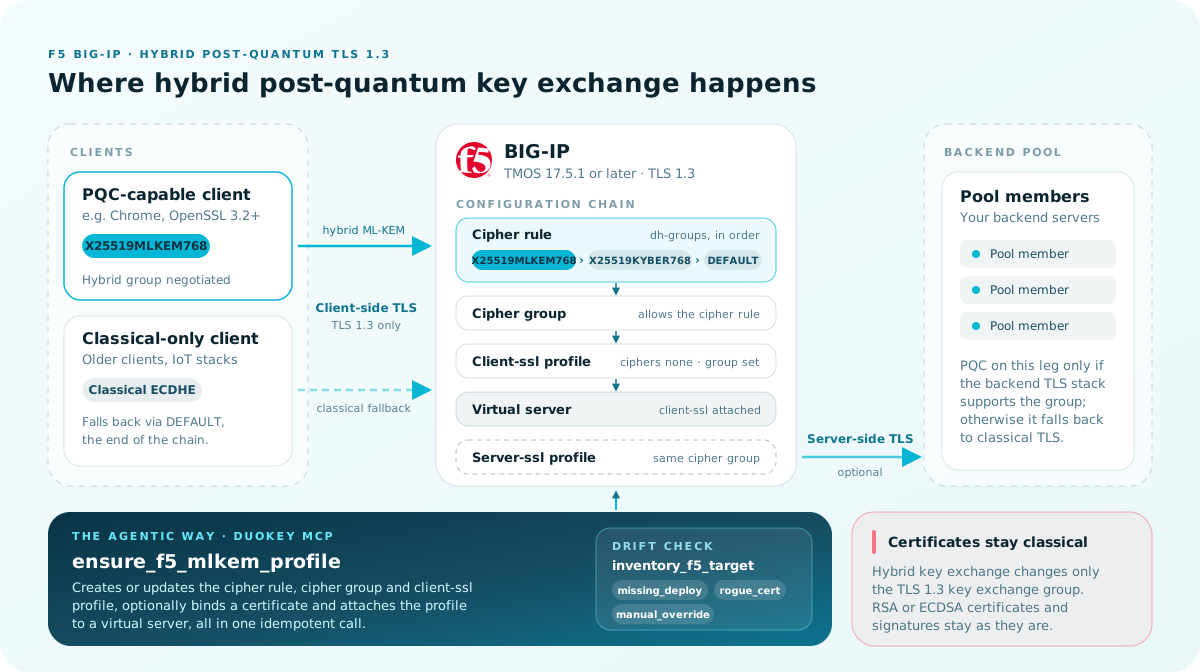
BIG-IP's post-quantum support is a hybrid key exchange, not a replacement of your certificates. TLS 1.3's key exchange (normally ECDHE, e.g. X25519) is paired with a quantum-resistant key encapsulation mechanism, ML-KEM (Module-Lattice-Based Key-Encapsulation Mechanism, NIST FIPS 203), so the session key is only as weak as the stronger of the two problems an attacker has to break, not the weaker one.
Your server certificate, its signature algorithm and your PKI stay classical (RSA or ECDSA) for now. What changes is the key exchange group negotiated during the TLS 1.3 handshake. That's the whole surface area of this guide: cipher rules, cipher groups and the client-ssl / server-ssl profiles that reference them.
Two reasons BIG-IP (and every other vendor) ships hybrid groups instead of pure ML-KEM:
This is the reason PQC on your edge matters before a cryptographically relevant quantum computer exists. An adversary capturing your TLS traffic today can store the ciphertext and decrypt it once a sufficiently powerful quantum computer breaks classical key exchange. For data with a long confidentiality shelf life, health records, legal documents, long-lived credentials, trade secrets, that's a live risk right now, not a future one. See our companion piece on store-now-decrypt-later for the full threat model.
Check what your platform actually supports before you plan anything: this moved fast across 2026 releases.
| TMOS version | What's supported |
|---|---|
| 17.5.0 | First PQC support: Kyber hybrid key exchange (X25519KYBER768). Deprecated: Chrome 138+ removed Kyber support entirely. |
| 17.5.1 | ML-KEM support aligned to the ratified NIST FIPS 203 standard: X25519MLKEM768 hybrid key exchange, client-side and server-side. This is the version most production rollouts should target. |
| 21.1 | Adds two additional NIST-approved hybrid groups, SecP256r1MLKEM768 and SecP384r1MLKEM1024, for both client- and server-side connections, and extends PQC support to SSL Forward Proxy use cases. |
Confirm your version before doing anything else:
tmsh show sys version
If you're on 17.5.0 with only Kyber configured, plan a migration to the MLKEM groups. Kyber is a pre-standardization draft of the algorithm and is actively being dropped by browser vendors.
PQC on your edge is not a "nice to have someday" the way it may have felt in 2023. Concrete drivers pushing this into 2026-2027 roadmaps:
Regulatory deadlines. NIST's own guidance (SP 800-131A, IR 8547) sets a timeline for deprecating classical-only algorithms; several national frameworks (including Swiss FINMA guidance and EU-level CNSA 2.0-aligned requirements referenced by defense and critical-infrastructure suppliers) have working migration deadlines inside this decade, not the next.
"Store now, decrypt later" exposure. Anything encrypted in transit through your BIG-IP today, and worth reading in five to ten years, is exposed to a future quantum-capable adversary who recorded it now.
Crypto-agility mandates. DORA and NIS2 both push regulated entities toward demonstrable, auditable crypto-agility: the ability to show you can change cryptographic controls on a plan, not in a scramble. Enabling and testing hybrid PQC on your highest-traffic TLS termination point is a concrete, auditable step toward that.
You're not ready if: your BIG-IP fleet isn't yet on 17.5.1+, you haven't inventoried which virtual servers and client populations you're touching, or you have no fallback/rollback plan. Fix those first; see Requirements.
SecP256r1/SecP384r1 groups or SSL Forward Proxy support)DEFAULT) so those clients still connect.X25519MLKEM768. Older clients and many embedded/IoT TLS stacks do not; audit your actual traffic before assuming coverage.This is the client-side flow first (BIG-IP terminating TLS from external clients), then the server-side flow (BIG-IP re-encrypting to your backend pool members).
tmsh show sys version
Do not proceed past this step on anything older than 17.5.1.
The dh-groups field carries the key-exchange groups, in negotiation order, ending in a classical fallback:
create ltm cipher rule PQC_HYBRID cipher DEFAULT \
  dh-groups X25519MLKEM768:X25519KYBER768:DEFAULT \
  signature-algorithms DEFAULT
On 21.1+, add the additional NIST groups to the chain:
create ltm cipher rule PQC_HYBRID cipher DEFAULT \
  dh-groups X25519MLKEM768:SecP256r1MLKEM768:SecP384r1MLKEM1024:X25519KYBER768:DEFAULT \
  signature-algorithms DEFAULT
create ltm cipher group PQC_HYBRID_GROUP allow add { PQC_HYBRID }
The profile must have TLS 1.3 enabled and reference the cipher group, not a raw cipher string:
create ltm profile client-ssl PQC_CLIENTSSL \
  cipher-group PQC_HYBRID_GROUP \
  ciphers none \
  options { dont-insert-empty-fragments }
If you're editing an existing profile instead of creating a new one, confirm its options include TLS 1.3 support and that ciphers is set to none so the cipher group actually takes effect (a non-none ciphers string on the profile silently overrides the group).
Start with one virtual server:
tmsh modify /ltm virtual my_https_vs profiles add { PQC_CLIENTSSL { context clientside } }
Or, creating a new virtual server end to end for a first test:
tmsh create /ltm virtual quantum_test \
  destination 10.0.2.113:443 ip-protocol tcp pool my_pool \
  profiles add { PQC_CLIENTSSL { context clientside } tcp }
If your backend pool members also need to negotiate PQC with BIG-IP (rather than BIG-IP decrypting to plaintext or classical TLS toward the pool), create the equivalent server-ssl profile using the same cipher group:
create ltm profile server-ssl PQC_SERVERSSL \
  cipher-group PQC_HYBRID_GROUP \
  ciphers none

tmsh modify /ltm virtual my_https_vs profiles add { PQC_SERVERSSL { context serverside } }
Server-side PQC only helps if your backend TLS stack also supports the negotiated group; most application servers don't yet. Confirm before enabling this in production, or you'll force a fallback to classical TLS on every backend connection anyway.
tmsh save /sys config
Everything from Step 2 to Step 6 above (cipher rule, cipher group, client-ssl profile, optional cert binding and virtual server attachment) collapses into a single, idempotent call when your BIG-IP is registered as a DuoKey deploy target and you're driving it through DuoKey's agentic MCP tools. DuoKey's MCP server works with any MCP-compatible client: connect it once and every agent you use, Claude or ChatGPT included, gets the same F5 tools.
Both Claude and ChatGPT support custom MCP connectors today: give the connector a name and DuoKey's MCP server URL, and its F5 tools, along with the rest of DuoKey's PKI and key management tools, become available in that chat.
Mockups below are illustrative, built to show the shape of the setup, not screenshots of the live product UI.
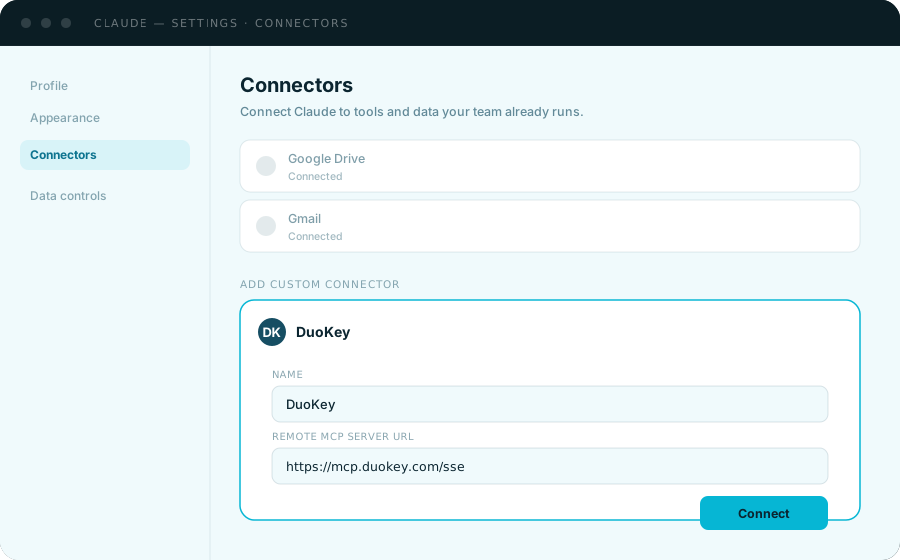
In Claude: Settings → Connectors → Add custom connector, name it "DuoKey", paste the remote MCP server URL, and connect.
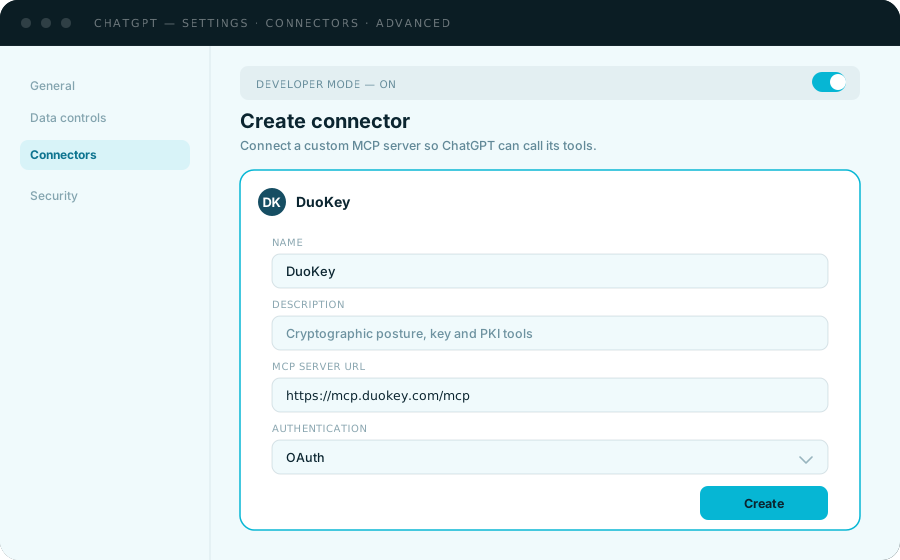
In ChatGPT: Settings → Connectors → Advanced → Developer mode, then Create connector with the same MCP server URL and your authentication method (OAuth, if your DuoKey tenant requires it).
Either way, the tools you're calling, ensure_f5_mlkem_profile, list_f5_virtual_servers, inventory_f5_target and the rest, are the same DuoKey MCP server underneath; the client you're chatting in doesn't change what the tools do or which permissions they require.
ensure_f5_mlkem_profile(
  target_id: "YOUR-F5-DEPLOY-TARGET-UUID",
  profile_name: "pqc-www",
  virtual_name: "my_https_vs",        # optional: attach immediately
  cert_name: "www.example.com.crt",   # optional: bind an existing cert
  key_name: "www.example.com.key"
)
This single call implements F5 KB K000149577 end to end: it creates or updates the cipher rule with dh_groups defaulting to X25519MLKEM768:P256MLKEM768:P384MLKEM1024:DEFAULT, creates the cipher group allowing that rule, creates the client-ssl profile with ciphers none bound to the group, optionally binds your existing certificate, and optionally attaches the profile to a virtual server, so it's serving PQC traffic the moment the call returns.
It's idempotent: call it again to change the dh-groups list, rebind a certificate, or re-attach after a config change, without first having to work out whether the rule, group or profile already exists.
DuoKey exposes each piece as its own tool too, matching the manual tmsh sequence one-for-one. Use these when you want to change one part (say, rotate the cipher group on an existing profile) without touching the rest:
| MCP tool | Equivalent manual step |
|---|---|
create_f5_cipher_rule | Step 2: create ltm cipher rule ... dh-groups ... |
create_f5_cipher_group | Step 3: create ltm cipher group ... allow add { ... } |
create_f5_clientssl_profile | Step 4: create ltm profile client-ssl ... |
attach_f5_profile_to_virtual | Step 5: modify ltm virtual ... profiles add { ... } |
Two read-only tools remove the most common source of manual-tmsh mistakes: a mistyped virtual server or profile name.
list_f5_virtual_servers: every virtual server on the target, with its destination, so you attach the profile to the right one.list_f5_clientssl_profiles: every existing client-ssl profile, so you don't create a duplicate or guess a name that 404s.inventory_f5_target is a read-only crypto lifecycle management (CLM) check: it enumerates every certificate actually bound across the box's client-ssl profiles right now and compares that against what DuoKey last deployed, returning a drift verdict in three categories: missing_deploy (something DuoKey believes it deployed isn't there), rogue_cert (something's bound that DuoKey didn't put there) and manual_override (someone changed it outside the pipeline). Run this after any manual tmsh change to confirm your BIG-IP hasn't drifted from what your crypto posture management system believes is deployed, feeding directly into the audit trail described in Compliance and Audit Considerations.
Every write action above requires the Operations.Pki.Deploy.ConfigureTarget permission; the drift check only requires the narrower Operations.Pki.Deploy.Read. Scope agent and API credentials accordingly: an agent that only needs to audit drift should never hold configure-target rights.
Don't trust the config alone; verify the actual negotiated group on the wire.
tmsh show ltm profile client-ssl PQC_CLIENTSSL
tmsh show ltm virtual my_https_vs
From a client with OpenSSL 3.2 or later (which understands the ML-KEM group names):
openssl s_client -connect my_https_vs.example.com:443 -tls1_3 -groups X25519MLKEM768
Look for the negotiated group in the handshake output. If OpenSSL falls back silently, force TLS 1.3 explicitly and confirm the server actually offers the group (-groups only requests it; the server has the final say per its cipher group's dh-groups order).
Repeat the test forcing a classical-only client (omit -groups, or use an older OpenSSL/browser) and confirm the connection still succeeds via classical ECDHE. If it doesn't, your fallback chain is misconfigured or ciphers on the profile isn't set to none.
ML-KEM handshakes are more CPU-expensive per connection than ECDHE. Benchmark your virtual server under realistic concurrent-connection load before widening the rollout past your first test virtual server. This is the single most common cause of PQC rollouts causing unexpected latency or CPU alerts in production.
Hybrid groups are designed to degrade gracefully, but only if you configure the chain correctly.
Always end your dh-groups chain in DEFAULT. This is what lets pre-PQC clients negotiate classical ECDHE instead of failing the handshake entirely.
Order matters. BIG-IP (and the client) negotiate groups in the order listed. Put your strongest, most broadly supported PQC group first (X25519MLKEM768 as of this writing), then any additional PQC groups, then DEFAULT last.
Retire X25519KYBER768 on a plan, not by surprise. It's still listed as supported for backward compatibility, but Chrome 138+ already dropped it. Treat it as a bridge, not a destination.
Audit your actual client population before rollout. TLS fingerprinting or access-log analysis of negotiated cipher/group will tell you what share of real traffic is PQC-capable today, which tells you how much CPU headroom you actually need to provision.
Start with one virtual server, not a global cipher group swap. Prove CPU impact, client compatibility and stability on your lowest-risk traffic first.
Keep classical fallback in the chain deliberately. Removing DEFAULT too early locks out any client that hasn't caught up yet. That's an availability incident, not a security improvement.
Track your BIG-IP fleet's TMOS versions centrally. A cipher group referencing a PQC dh-group that an older device in the same traffic path doesn't understand will fail unpredictably, not gracefully.
Capacity-plan for the CPU delta, not just the feature toggle. ML-KEM handshakes cost more CPU per connection. Budget headroom before your highest-traffic virtual servers get the change, not after an incident.
Treat this as the first step, not the finish line. Client-side hybrid key exchange on your edge is the highest-leverage, lowest-disruption first move, but your certificates, signature algorithms and any backend cryptography are still classical. Plan the rest of your PQC migration; see our PQC migration roadmap guide.
Maintain visibility across your full TLS estate, not just BIG-IP. Confirming what's actually configured, cipher strings, TLS version windows, certificate inventory, across every device in scope is what turns a one-off tmsh change into an auditable, board-reportable migration. This is exactly the kind of inventory a cryptographic posture management (CPM) capability is built to maintain continuously, rather than re-discovering by hand at every audit cycle.
Check, in order: is the profile's ciphers field set to none (a non-none value silently overrides the cipher group); does the client actually support the negotiated group; is the cipher group correctly attached to the profile in the right context (clientside vs. serverside).
Your dh-groups chain likely doesn't end in DEFAULT, or an intermediate device in the path (another load balancer, a TLS-inspecting proxy) doesn't understand the extended ClientHello and is rejecting it outright. Test directly against the BIG-IP virtual server, bypassing intermediate devices, to isolate the cause.
Expected to some degree: ML-KEM handshakes are more expensive than ECDHE. If the increase is larger than your load testing predicted, check whether you're re-negotiating full handshakes more often than expected (session resumption misconfiguration compounds the PQC CPU cost per connection).
Most application server TLS stacks don't yet support ML-KEM groups. Confirm your backend stack's supported groups before enabling server-ssl PQC; otherwise every backend connection silently falls back to classical TLS and you gain nothing from the server-side change.
A cipher group referencing a dh-group unsupported on a peer device will not sync/apply consistently. Bring every device in the relevant traffic path and HA pair to at least 17.5.1 before rolling out PQC cipher groups.
Enabling hybrid PQC on your edge is a concrete, demonstrable step for several overlapping audit and regulatory conversations:
NIST alignment. Configuring X25519MLKEM768 (and the 21.1 additions) puts your key exchange on algorithms specified under the ratified FIPS 203 (ML-KEM) standard. Document the TMOS version and cipher rule as your evidence.
Crypto-agility demonstrations (DORA, NIS2). Both frameworks push regulated entities toward demonstrable ability to change cryptographic controls on a managed timeline. A tested, documented PQC rollout on your highest-traffic TLS termination point, including your fallback and rollback plan, is exactly the kind of evidence auditors are starting to ask for.
"Store now, decrypt later" risk register entries. If your risk register includes harvest-now-decrypt-later exposure for data flowing through this BIG-IP, this rollout is your primary mitigating control. Document the virtual servers covered and the client population still on classical-only fallback.
For the audit trail itself, document: TMOS version per device, the exact cipher rule/group configuration, which virtual servers are covered, your client compatibility testing results, and your rollback procedure. Configuration alone isn't evidence; the tested behavior under both PQC-capable and classical-only clients is.
Q: What TMOS version do I need for PQC on BIG-IP?
17.5.1 or later for ML-KEM support (X25519MLKEM768), which is what most production rollouts should target. 17.5.0 only supports the now-deprecated Kyber draft. 21.1+ adds SecP256r1MLKEM768 and SecP384r1MLKEM1024, plus SSL Forward Proxy support.
Q: Does enabling PQC mean my certificates need to change?
No. This is a hybrid key exchange change, not a certificate or signature algorithm change. Your existing RSA or ECDSA certificates and PKI continue to work exactly as before. What changes is how the TLS 1.3 session key is established.
Q: Does PQC work with TLS 1.2?
No. PQC key exchange on BIG-IP is compatible only with TLS 1.3. Your client-ssl profile must have TLS 1.3 enabled for the cipher group to have any effect.
Q: Will clients that don't support PQC still be able to connect?
Yes, as long as your dh-groups chain ends in DEFAULT and the profile's ciphers field is set to none so the cipher group actually governs negotiation. Misconfiguring either of those is the most common cause of unexpected handshake failures.
Q: What's the performance impact?
ML-KEM handshakes cost more CPU per connection than plain ECDHE, and the handshake messages are larger. The impact is per-handshake, not per-byte of application data, so the effect is most visible on high-connection-rate virtual servers. Load-test before a full rollout.
Q: Should I enable PQC on the server-side (to my backend pool) too?
Only if your backend application servers' TLS stacks actually support the ML-KEM groups; most don't yet. Enabling it without backend support just means every server-side connection falls back to classical TLS, adding configuration complexity with no security benefit.
Q: Is Kyber (X25519KYBER768) still safe to use?
It still works on BIG-IP for backward compatibility, but it's a pre-standardization draft that browser vendors are actively dropping (Chrome 138+ removed it). Treat it as a fallback rung in your chain, not your primary target; that's X25519MLKEM768.
Q: How do I know what share of my real traffic is already PQC-capable?
Analyze negotiated cipher/group in your access logs or via TLS fingerprinting before and after rollout. This tells you both your actual current exposure and how much CPU headroom to provision as adoption grows.
Q: Do I have to run all these tmsh commands by hand?
No. If your BIG-IP is a registered DuoKey deploy target, ensure_f5_mlkem_profile performs the cipher rule, cipher group, client-ssl profile, cert binding and virtual-server attachment in one idempotent call; see The Agentic Way. The manual tmsh sequence is still worth understanding so you know what that call is actually doing to your configuration.
Hybrid PQC key exchange on BIG-IP is one of the highest-leverage, lowest-disruption moves available in a broader post-quantum migration, but "lowest disruption" only holds if you roll it out deliberately.
dh-groups chain ends in DEFAULT for classical fallbackciphers field is set to none so the cipher group actually governs negotiationOnce your first virtual server is stable, extend the same cipher group to the rest of your externally facing traffic on a schedule, and start the harder conversation about certificates, signature algorithms and backend cryptography, which hybrid key exchange on the edge does not solve by itself.
Geschrieben von
Nagib Aouini
Related Resources
Sagen Sie uns, wo Kontrolle heute schwierig ist. Wir helfen Ihnen, den nächsten praktischen Schritt zu finden.