
Customer-Controlled Encryption Keys: AWS XKS, Office 365 Customer Key & Complete Data Control
Feb 06, 2026
ArticleDiscover what Customer-Controlled Encryption keys are and why your organisation need them
Read article

Implement AWS External Key Store (XKS) so Amazon cannot complete decryption alone, architecture, ownership and operating evidence for regulated workloads.
Your CISO just asked how your organization can use AWS services while maintaining complete cryptographic control over encryption keys outside Amazon's infrastructure. The answer is AWS XKS (External Key Store),but it comes with real complexity, significant costs and a fundamental shift in your operational responsibilities.
This guide cuts through the noise. You'll understand exactly what XKS is, whether you actually need it, how to implement it and what it'll cost you, including the parts vendors won't volunteer upfront.
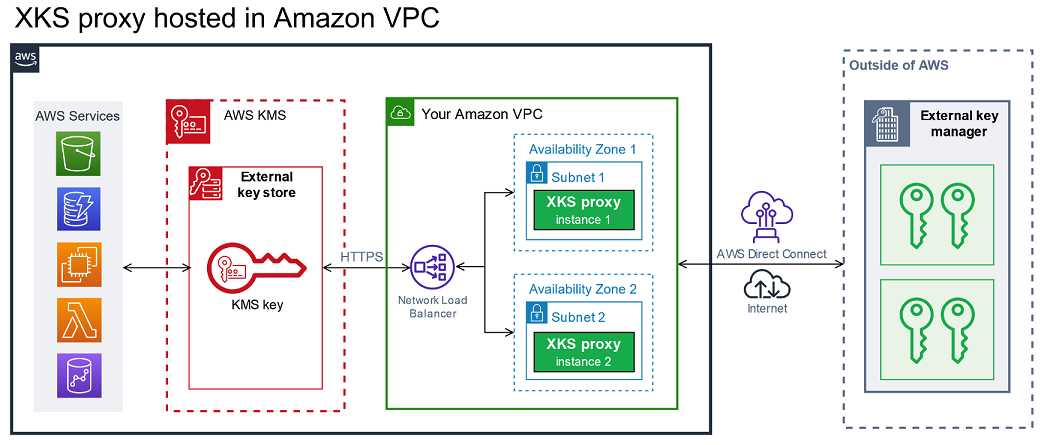
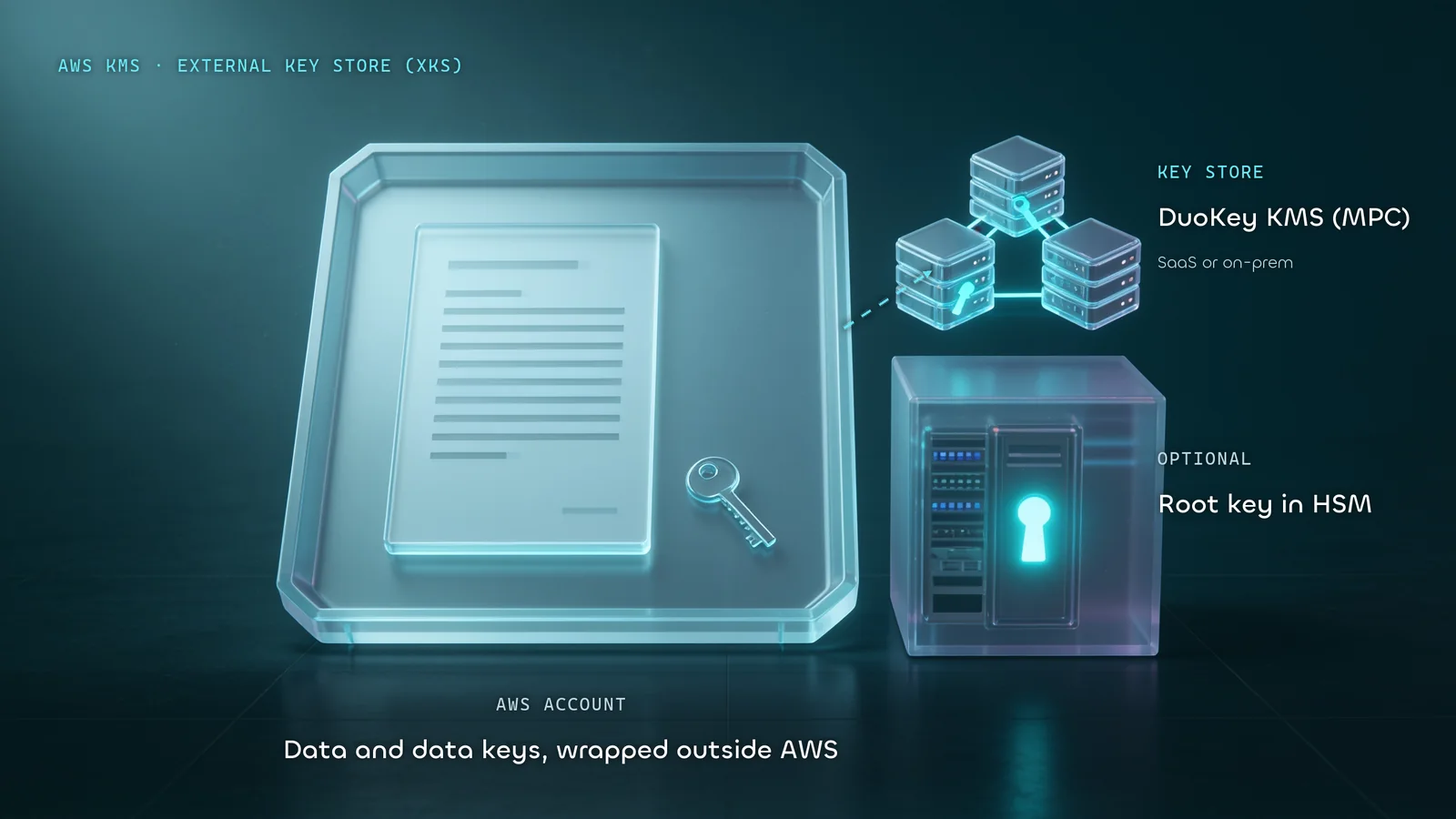
AWS External Key Store (XKS) is a feature of AWS Key Management Service (KMS) that lets you use encryption keys that are generated, stored and managed entirely outside of AWS infrastructure -- in hardware or software you own and control.
Announced at re:Invent 2022 and now a mature capability, XKS addresses a specific gap: organizations that need the breadth of AWS services but cannot, by regulation or policy, allow their cryptographic root keys to reside on AWS infrastructure.
Under standard AWS KMS, Amazon manages the key material inside its own secure infrastructure. You control access to keys, but the keys themselves live in AWS. XKS inverts this: your keys live in your infrastructure and AWS calls out to them when it needs to perform cryptographic operations.
| Term | Definition |
|---|---|
| External Key Store (XKS) | A custom key store backed by your external key manager |
| XKS Proxy | Customer-managed middleware that translates KMS API calls to your key manager's protocol |
| External Key Manager | Your HSM, software KMS, or key management platform outside AWS |
| XksKeyId | The identifier of your external key, linked to a KMS key |
| Double Envelope Encryption | Data is encrypted first by AWS KMS, then again by your external key manager |
One clarification that surprises many architects: XKS uses double envelope encryption. Data is encrypted using the KMS key material and your external key. This means ciphertext protected by XKS is always at least as strong as standard KMS -- it's additive, not a replacement.
Understanding the request flow is essential before you commit to XKS. Every encrypt or decrypt operation follows this path:
This entire round-trip happens synchronously. If any step in that chain fails or exceeds the latency threshold (typically 250 ms), the KMS operation fails -- and depending on the AWS service, that failure can cascade.
This is where many organizations underestimate XKS. Under standard KMS, AWS handles availability, patching, scaling and disaster recovery of the key infrastructure. Under XKS, you take on all of that for your proxy and external key manager -- including the physical facility, power, cooling, network, OS and application layers.
If your external key manager goes down, AWS services relying on XKS keys cannot encrypt or decrypt. This is not a hypothetical failure mode -- it's the expected behavior and it's your responsibility to design against it.
Before you invest in XKS, compare it honestly against alternatives.
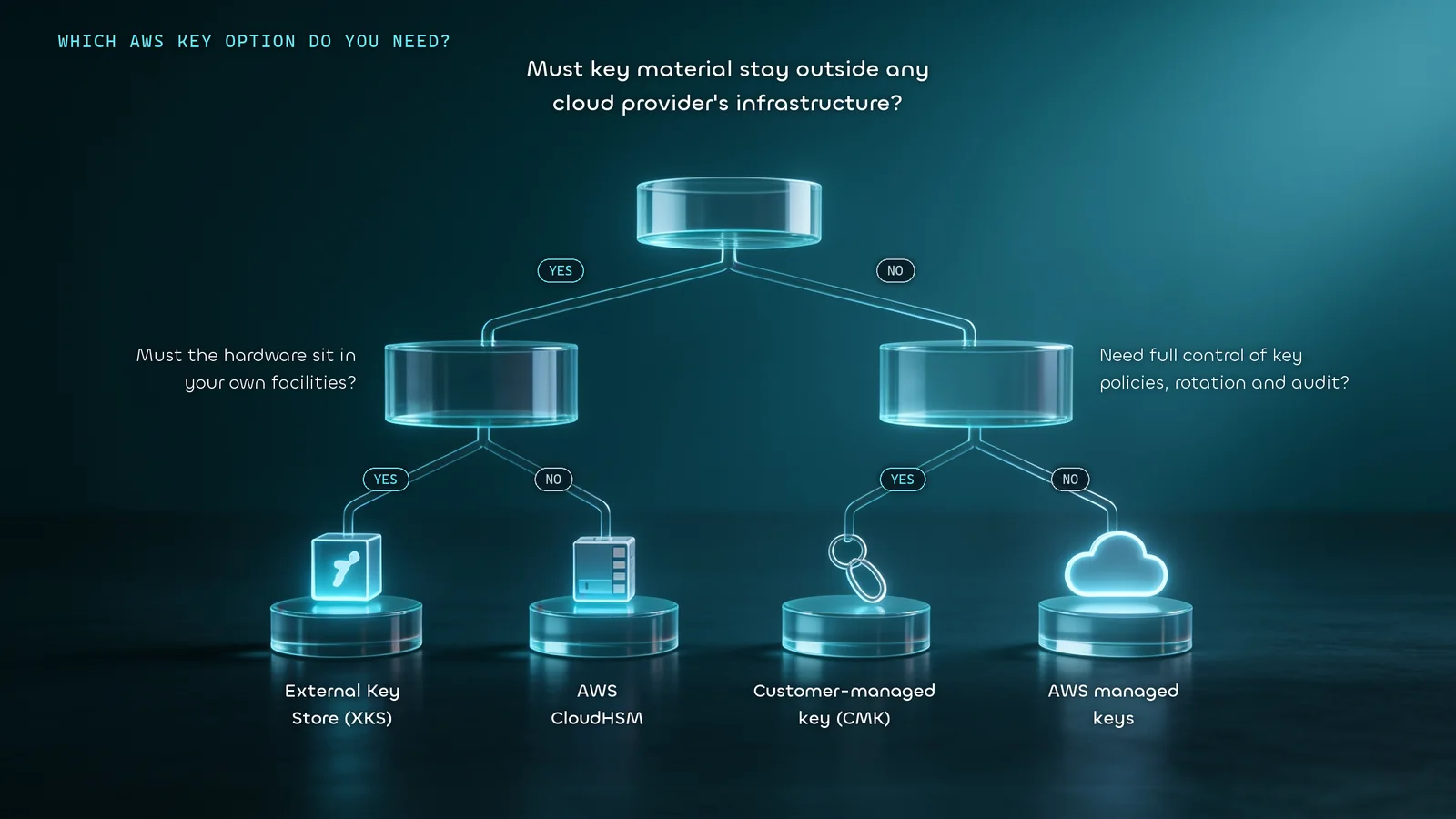
With standard customer-managed keys (CMKs), you control key policies and access -- who can use the key, under what conditions, with full audit logging. AWS still holds the key material in its own KMS infrastructure.
Use CMKs when: you need strong access control and auditability, but your compliance requirements don't mandate that key material lives outside AWS.
Use XKS when: regulations or organizational policy explicitly require that cryptographic key material never resides on third-party (i.e., AWS) infrastructure.
CloudHSM gives you dedicated, single-tenant Hardware Security Modules inside AWS data centers. You control the HSM, its users and its keys -- AWS has no access to the key material. However, the HSMs themselves are physically in AWS-owned facilities.
| XKS | CloudHSM | |
|---|---|---|
| Key location | Your infrastructure | AWS data center (dedicated HSM) |
| AWS physical access | None | No access to HSM content, but hardware is on AWS premises |
| Latency | Higher (external round-trip) | Lower (within AWS network) |
| Availability responsibility | Entirely yours | Shared (AWS manages hardware; you manage HSM software) |
| Cost | Higher total cost | ~$1.45/hr per HSM cluster |
| Compliance fit | Strict sovereignty mandates | Most FIPS 140-2 Level 3 requirements |
| Complexity | Very high | High |
Choose CloudHSM if you need FIPS 140-2 Level 3 hardware validation and can tolerate keys residing physically within AWS. Choose XKS only if your compliance mandate explicitly requires keys to remain outside AWS-owned facilities entirely.
For the majority of workloads -- including most HIPAA, PCI-DSS and SOC 2 requirements -- standard customer-managed KMS keys are sufficient. XKS is purpose-built for the narrow set of regulations (certain EU data sovereignty requirements, specific financial sector rules, US government mandates) that explicitly require no cloud provider access to key material under any circumstance.
Ask these three questions in order:
XKS exists for a specific compliance scenario, not general security improvement. These are the legitimate use cases:
Regulatory data sovereignty -- Regulations such as GDPR (compounded by the Schrems II ruling) require EU organizations to be able to prove that encryption keys never leave their controlled jurisdiction and to revoke cloud provider access at any time. XKS satisfies this by placing keys in EU-based infrastructure outside AWS.
CLOUD Act exposure mitigation -- Organizations concerned about the US CLOUD Act (which allows US law enforcement to compel US cloud providers to produce data) use XKS to ensure AWS cannot access key material under compulsion. Your external key manager, in a separate jurisdiction, holds the only copy.
Financial services mandates -- Certain central bank regulations and financial sector supervisory frameworks require "operational resilience" provisions that include maintaining control of cryptographic material external to the primary cloud provider.
Government and defense workloads -- US federal agencies handling CUI (Controlled Unclassified Information) or classified data under FedRAMP High or DoD IL frameworks may have explicit key custody requirements.
Zero-trust key architecture -- Organizations implementing strict zero-trust models where no single vendor has complete access to both data and keys.
What XKS is not for: general security hardening, achieving HIPAA compliance (standard KMS is sufficient), reducing AWS vendor lock-in for non-cryptographic reasons, or saving money. It's more expensive and more complex than every alternative.
Before you start implementation, validate all of these.
Your external key manager must:
Validated external key managers with native XKS proxy support include:
XKS supports two connectivity models:
Public endpoint connectivity -- AWS KMS reaches your proxy over the internet via HTTPS. Simpler to configure, but exposes your proxy endpoint to the public internet. Acceptable only with robust mTLS authentication.
VPC endpoint service connectivity -- AWS KMS connects via an AWS PrivateLink VPC endpoint service you create and maintain. This keeps traffic off the public internet and is the recommended approach for production workloads.
Your proxy must be reachable with:
/kms/xks/v1 (or a prefix ending in that path)Configure your chosen key manager to generate and store AES-256 keys. Note the external key ID (XksKeyId) for each key you plan to use -- you'll reference this when creating KMS keys.
Ensure your key manager is deployed with high availability. At minimum: active-passive failover. For production: active-active across two or more independent nodes.
Your proxy is the critical piece. Deployment options:
On-premises proxy connecting via public endpoint: Proxy runs in your data center, exposed via public HTTPS endpoint. Use only if VPC connectivity isn't viable.
Proxy on EC2 within a VPC (recommended): Deploy the proxy on an EC2 instance in a private subnet. Create a VPC endpoint service pointed at a Network Load Balancer in front of your proxy. AWS KMS connects via PrivateLink.
Proxy on-premises connecting via VPC: Run the proxy on-premises but connect it to a VPC endpoint service through a Site-to-Site VPN or Direct Connect. Maximum security, maximum complexity.
For high availability, deploy proxy instances across multiple Availability Zones behind a Network Load Balancer.
Authentication between KMS and your proxy uses a SigV4-like credential scheme -- an access key ID and a secret access key that you configure on both the proxy and in KMS. Rotate these credentials regularly.
Create the external key store using the AWS CLI:
# Create external key store with VPC endpoint service connectivity
aws kms create-custom-key-store \
  --custom-key-store-name "MyExternalKeyStore" \
  --custom-key-store-type EXTERNAL_KEY_STORE \
  --xks-proxy-connectivity "VPC_ENDPOINT_SERVICE" \
  --xks-proxy-uri-endpoint "https://myproxy-private.xks.example.com" \
  --xks-proxy-uri-path "/kms/xks/v1" \
  --xks-proxy-vpc-endpoint-service-name "com.amazonaws.vpce.us-east-1.vpce-svc-0example" \
  --xks-proxy-authentication-credential \
    AccessKeyId=ABCDE12345670EXAMPLE,RawSecretAccessKey=supersecretkeyvalue
Connect the key store:
aws kms connect-custom-key-store \
  --custom-key-store-id cks-1234567890abcdef0
Verify connection status:
aws kms describe-custom-key-stores \
  --custom-key-store-id cks-1234567890abcdef0
A healthy response shows "ConnectionState": "CONNECTED".
aws kms create-key \
  --custom-key-store-id cks-1234567890abcdef0 \
  --xks-key-id "your-external-key-id" \
  --description "XKS-backed key for S3 bucket encryption" \
  --key-usage ENCRYPT_DECRYPT
Attach a key policy that grants access to the services and principals that need to use the key:
{
  "Version": "2012-10-17",
  "Statement": [
    {
      "Sid": "Enable KMS key administration",
      "Effect": "Allow",
      "Principal": {
        "AWS": "arn:aws:iam::123456789012:role/KeyAdminRole"
      },
      "Action": [
        "kms:Create*",
        "kms:Describe*",
        "kms:Enable*",
        "kms:List*",
        "kms:Put*",
        "kms:Update*",
        "kms:Revoke*",
        "kms:Disable*",
        "kms:Get*",
        "kms:Delete*"
      ],
      "Resource": "*"
    },
    {
      "Sid": "Allow use of the key",
      "Effect": "Allow",
      "Principal": {
        "AWS": "arn:aws:iam::123456789012:role/AppRole"
      },
      "Action": [
        "kms:Encrypt",
        "kms:Decrypt",
        "kms:ReEncrypt*",
        "kms:GenerateDataKey*",
        "kms:DescribeKey"
      ],
      "Resource": "*"
    }
  ]
}
Test the connection explicitly before using the key store in production:
# Test encrypt/decrypt round-trip
aws kms generate-data-key \
  --key-id "arn:aws:kms:us-east-1:123456789012:key/your-key-id" \
  --key-spec AES_256
Test failover scenarios: take your proxy offline and confirm that AWS services handle the failure gracefully and recover when the proxy returns. Never skip this test in staging.
The proxy deserves dedicated attention because it's the most common source of implementation problems.
The proxy implements the AWS XKS Proxy API specification, a REST API over HTTPS that defines five operations: GetHealthStatus, GetKeyMetadata, Encrypt, Decrypt and GetXksProxyConfiguration.
requestMetadata field containing the AWS principal ARN and KMS key ARN -- this enables you to implement additional authorization at the proxy layer beyond IAMAWS provides an open-source reference implementation in Rust, runnable as a container, compatible with any PKCS#11 HSM. This is a reasonable starting point for organizations using non-vendor-supported key managers.
For production use, add:
Every KMS call for an XKS-backed key involves an external network round-trip. For workloads generating thousands of KMS requests per second, this adds up. AWS caches data keys at the service level (e.g., S3 caches data keys for a few minutes when bucket keys are enabled), which reduces the raw request volume to your proxy -- but you still need to capacity-plan for peak load.
Benchmark your proxy under realistic load before go-live. XKS_PROXY_TIMED_OUT errors indicate your proxy is too slow; XKS_PROXY_INVALID_RESPONSE indicates a protocol issue.
Use VPC endpoint service connectivity -- never expose your proxy endpoint publicly unless absolutely necessary. The additional PrivateLink setup is worth the reduced attack surface.
Implement proxy-level authorization -- the requestMetadata in every KMS request includes the calling principal's ARN. Use this to enforce granular policies at the proxy layer: specific IAM roles can only use specific external keys, certain operations are blocked outside business hours, etc.
Rotate proxy authentication credentials on a defined schedule. Use AWS Secrets Manager to store and auto-rotate the secret access key used for KMS-to-proxy authentication.
Monitor and alert on all proxy errors -- specifically watch for XKS_PROXY_TIMED_OUT, XKS_PROXY_NOT_REACHABLE and INVALID_KEY_USAGE errors in CloudTrail. Any sustained error rate should trigger an incident response.
Key lifecycle management -- document explicit procedures for key rotation (your external key manager can rotate key material behind the same XksKeyId), key deletion (coordinate between KMS key deletion and external key deletion -- getting this order wrong causes permanent data loss) and emergency key revocation (your proxy is the kill switch: take it offline and all XKS operations cease).
Disaster recovery -- maintain a tested recovery runbook. If your external key manager suffers a catastrophic failure, you need to restore it and reconnect before any data encrypted with XKS keys becomes inaccessible permanently. Back up your external key material using your key manager's native backup mechanisms.
XKS_PROXY_NOT_REACHABLE -- KMS cannot reach the proxy endpoint. Check: network routing, security group rules, NLB health checks, proxy process status.
XKS_PROXY_TIMED_OUT -- Proxy reachable but not responding within the timeout. Check: proxy application logs, external key manager latency, proxy instance CPU/memory, network latency between proxy and key manager.
XKS_PROXY_INVALID_RESPONSE -- Proxy responded but the response doesn't conform to the XKS API spec. Check proxy implementation for API version mismatches or serialization bugs.
XKS_PROXY_ACCESS_DENIED -- Credential mismatch between KMS and proxy configuration. Verify the AccessKeyId and RawSecretAccessKey match exactly on both sides. Credentials are case-sensitive.
XKS_KEY_NOT_FOUND -- The XksKeyId referenced in KMS doesn't exist in your external key manager, or the proxy can't find it. Verify the key ID is correct and the key is enabled in your external key manager.
XKS_KEY_DISABLED_IN_EXTERNAL_KEY_MANAGER -- The key is disabled at the external key manager level. This is independent of the KMS key's enabled status. Re-enable at the source.
# Check connection state and error codes
aws kms describe-custom-key-stores \
  --custom-key-store-id cks-1234567890abcdef0

# CloudTrail -- filter for XKS-related errors
aws cloudtrail lookup-events \
  --lookup-attributes AttributeKey=EventSource,AttributeValue=kms.amazonaws.com \
  --start-time 2026-01-01T00:00:00Z
Enable proxy-level access logging and correlate proxy logs with CloudTrail events using the requestId field present in both.
XKS creates a more complex audit trail than standard KMS, but a more complete one -- if you instrument it correctly.
CloudTrail logs every KMS API call involving XKS keys, including the calling principal, key ARN and operation result. This is your primary audit artifact for demonstrating key usage control to regulators.
Proxy-level logs capture every request forwarded from KMS to your external key manager. When configured to log the requestMetadata (which includes the original AWS principal ARN), you have an end-to-end audit trail from AWS service call through to cryptographic operation.
External key manager audit logs provide the authoritative record of which keys were used, when and by which proxy identity.
For GDPR / Schrems II compliance, document:
For PCI-DSS, ensure the external key manager meets key management requirements under PCI-DSS v4.0 Requirement 3.7, including dual control and split knowledge procedures for key custodians.
Q: What is AWS XKS?
AWS XKS (External Key Store) is a feature of AWS KMS that lets you use encryption keys stored and managed entirely outside AWS infrastructure. Your keys live in your external key manager; AWS calls out to your XKS proxy whenever it needs to perform cryptographic operations.
Q: When do I need XKS instead of standard KMS?
When regulations or organizational policies explicitly require that cryptographic key material never reside on third-party (including cloud provider) infrastructure. Common drivers include GDPR + Schrems II for EU data sovereignty, CLOUD Act mitigation and certain financial sector mandates. For most HIPAA, PCI-DSS and SOC 2 requirements, standard CMKs are sufficient.
Q: What is an XKS proxy?
The XKS proxy is middleware you own and operate. It sits between AWS KMS and your external key manager, translating AWS XKS API requests into your key manager's native protocol. It also provides an additional authorization layer and acts as a kill switch -- disable the proxy and all XKS encrypt/decrypt operations stop.
Q: What happens if my external key manager goes down?
AWS services that rely on XKS-backed keys will be unable to perform new encrypt or decrypt operations. Some services (like S3 with bucket keys enabled) cache data keys for a few minutes, providing brief resilience. But a sustained outage means your AWS workloads cannot process encrypted data. High availability is non-negotiable.
Q: Can I use XKS with all AWS services?
XKS works with most AWS services that support customer-managed KMS keys, including S3, EBS, RDS, DynamoDB, Lambda and others. AWS is progressively validating and documenting per-service support. Always verify your specific service and AWS region against the current documentation before design commitment.
Q: Is XKS the same as CloudHSM?
No. CloudHSM provides dedicated hardware HSMs physically located in AWS data centers, but under your exclusive control. XKS takes this further -- your key material lives in infrastructure you operate, outside AWS-owned facilities entirely. XKS has higher operational complexity, higher total cost and higher latency than CloudHSM.
Q: How does key rotation work with XKS?
Rotation is more complex than standard KMS. You cannot use KMS automatic key rotation for XKS keys. Instead, your external key manager rotates the key material associated with the same XksKeyId -- AWS KMS continues referencing the same key ID and your key manager transparently uses the new key material. Coordinate rotation procedures carefully between your key manager operations team and your AWS team.
Q: Can I migrate existing KMS-encrypted data to XKS?
Not directly. There is no re-encryption path that moves existing CMK-encrypted data to XKS without decrypting and re-encrypting each object. For S3, this means iterating through all objects; for EBS volumes, you'd need snapshot-and-restore workflows. Plan migration carefully and budget significant time and cost for large datasets.
XKS is purpose-built for a narrow, specific compliance scenario. It delivers on its promise -- cryptographic key material under your exclusive control, outside AWS infrastructure -- but at the cost of significant operational complexity, higher latency and substantially higher costs.
Use this checklist before committing:
If you can check all of these, XKS is a well-designed solution to a hard problem. If you're checking fewer than four, take another look at CloudHSM or well-governed CMKs -- they may satisfy your actual requirements with far less operational burden.
Written by
Nagib Aouini
Related Resources
Tell us where control is difficult today. We will help you identify a practical next step.