
MPC vs HSM: Which Key Management Approach Secures Your Enterprise?
Feb 25, 2026
ArticleCompare HSM, MPC and software-defined HSM (SD-HSM) for cloud programmes: single points of failure, TCO and when each custody model fits.
Read article

TDE with EKM encrypts SQL Server files and backups; Always Encrypted hides columns from the engine. Threat models, limits and external key setup compared.
"We need SQL Server encrypted with our own key" can mean two very different things. One is Transparent Data Encryption (TDE) with an Extensible Key Management (EKM) provider, where the key that protects your database files lives outside the server. The other is Always Encrypted, where selected columns are encrypted in the client driver and the SQL Server engine never sees their plaintext. Both keep a key outside the database. They protect against different attackers.
Teams often mix the two up, and they find out late: an auditor asks whether the DBA can read the national ID column, and the answer under TDE is yes. This guide covers what each feature protects, where the key lives, which threats each one stops, the limits you accept, and how DuoKey provides the external key in each model.
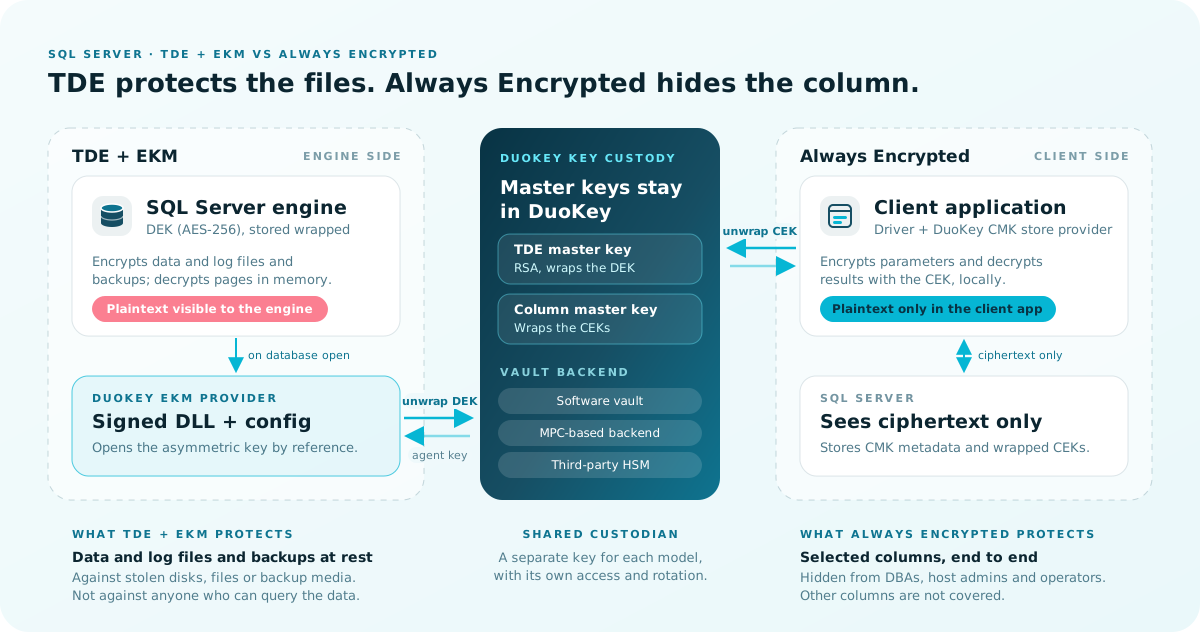
| TDE with EKM | Always Encrypted | |
|---|---|---|
| What is encrypted | Data and log files at rest, and backups of the database | Specific column values, end to end |
| Where decryption happens | Inside the SQL Server engine, when pages are read into memory | Inside the client driver, before and after the round trip to SQL Server |
| Who sees plaintext | The engine, and anyone with the right database permissions at query time | Only client applications that can reach the column master key |
| External key | An asymmetric key in the EKM provider protects the database encryption key (DEK) | The column master key (CMK) in a key store outside the database protects column encryption keys (CEKs) |
| Application changes | None | Driver setting, parameterized queries, and some schema constraints |
| DuoKey's role | EKM provider: the RSA master key stays in the DuoKey vault | CMK store provider: DuoKey holds the CMK the driver uses to unwrap CEKs |
The rule that matters most: if the requirement is "the SQL Server administrator must never see this column's plaintext", you need Always Encrypted. If the requirement is "data files and backups must be encrypted with a key we control outside the server", you need TDE with EKM. (DuoKey docs)
TDE encrypts SQL Server data and log files at the page level. Pages are encrypted before they are written to disk and decrypted when they are read into memory, and backup files of a TDE database are also encrypted with the DEK. Microsoft describes the threat it addresses directly: someone who steals drives or backup tapes and tries to restore or attach the database. (Microsoft Learn: TDE)
The DEK is a symmetric key stored in the database boot record. It is protected either by a certificate in master or by an asymmetric key held in an EKM module. EKM lets a third-party provider register its module with SQL Server so that the key protecting the database files can live off the box, with physical separation of data and keys and an extra authorization check that supports separation of duties. (Microsoft Learn: EKM)
With the DuoKey SQL EKM provider, the chain looks like this:
master, opened from the provider. It is a reference to the vault key, not a copy.SQL Server asks the provider to unwrap the DEK whenever it opens the database, including after a service restart. If the external asymmetric key is lost, SQL Server can't open the database. (Microsoft Learn: Enable TDE using EKM)
master, model or msdb. (Microsoft Learn: TDE)Always Encrypted encrypts sensitive columns inside client applications, so the encryption keys are never exposed to the Database Engine. The Always Encrypted-enabled driver encrypts parameter values before sending them and decrypts results on the way back. Microsoft positions it as a separation between people who own the data and people who manage it: on-premises DBAs, cloud database operators and other high-privileged users. (Microsoft Learn: Always Encrypted)
It uses two keys:
The database never holds plaintext CMKs or CEKs, which is why data protected this way stays safe even if the database system is compromised. (Microsoft Learn: Key management for Always Encrypted)
With DuoKey, a DuoKey vault key acts as the CMK. SQL Server stores the CMK's key store provider name (DUOKEY_CNG by default) and key path. When the application queries an encrypted column, the driver reads that metadata and the wrapped CEK, calls the DuoKey CMK store provider to unwrap the CEK, and then encrypts or decrypts the value locally. SQL Server only ever stores and returns ciphertext for that column. (DuoKey docs: SQL Always Encrypted)
DUOKEY_CNG is not one of Microsoft's built-in provider names (those start with MSSQL_ or are AZURE_KEY_VAULT). The application's driver has to resolve it as a custom key store provider registered with the driver. (Microsoft Learn: CREATE COLUMN MASTER KEY, Microsoft Learn: Always Encrypted with Microsoft.Data.SqlClient)
(Microsoft Learn: Always Encrypted)
| Threat | TDE with EKM | Always Encrypted |
|---|---|---|
| Stolen disks, data files or backup media | Protected: files and backups are encrypted, and restoring needs the external key | Protected columns stay ciphertext; other columns are not covered |
DBA or sysadmin running SELECT | Not protected: the engine returns plaintext | Protected, if the DBA has no access to the CMK or key store (Microsoft Learn) |
| Host admin scanning SQL Server memory or dump files | Not protected: pages are decrypted in memory | Protected; Microsoft lists this attack explicitly (Microsoft Learn) |
| Malware on the database host | Not protected once the database is open | Protected; listed by Microsoft |
| Cloud or data-center operator | Files taken off the host can't be opened without the external key | Protected; Microsoft names cloud database operators as a target of the feature |
| Key custody and separation of duties | The master key sits outside the server, behind an extra authorization check (Microsoft Learn: EKM) | Security admins hold the keys and DBAs manage only metadata, when you run key management with role separation |
One caveat on Always Encrypted: its protection is only as good as your key handling. Microsoft recommends never generating CMKs or CEKs on the machine that hosts the database, and not letting the person you are protecting against (for example, the DBA) generate the keys. (Microsoft Learn: Key management for Always Encrypted)
SET ENCRYPTION SUSPEND and continue it with SET ENCRYPTION RESUME.tempdb is encrypted as soon as any database uses TDE, which can affect unencrypted databases on the same instance. Instant file initialization is unavailable. Replication doesn't carry encryption to subscribers automatically.READ ONLY.=, IN, GROUP BY, DISTINCT), and randomized columns support none. You can't mix encrypted and plaintext operands. Values for encrypted columns have to be sent as query parameters, not literals. (Microsoft Learn: Always Encrypted)xml, text, ntext, image, sql_variant and spatial types. IDENTITY columns, computed columns, full-text indexed columns and columns with default constraints are also excluded. String columns need a _BIN2 collation.FOR XML / FOR JSON don't work on encrypted columns. Always On availability groups are supported.LIKE, in-place encryption and, from SQL Server 2022, JOIN, GROUP BY and ORDER BY on randomized columns. Enclave-enabled CMKs are supported only in Windows Certificate Store and Azure Key Vault. (Microsoft Learn: Always Encrypted with secure enclaves)| TDE / EKM | Always Encrypted | |
|---|---|---|
| Microsoft edition support | Enterprise only in SQL Server 2016 and 2017. Enterprise and Standard from SQL Server 2019. Not in Express. (2016, 2022) | All editions, including Express, from SQL Server 2016 SP1 |
| DuoKey provider support | SQL Server 2016 or later, Enterprise or Developer edition on Windows. Express and LocalDB are not supported. Azure SQL Managed Instance and SQL Server on Linux can't load a custom Windows EKM provider. (DuoKey SQL EKM Overview) | Depends on the client: an Always Encrypted-enabled driver that can resolve the DuoKey CMK store provider |
| Host-side components | A signed provider DLL and a config.toml on the SQL Server host | Nothing on the SQL Server host. The key store provider runs with the client application |
Two notes. First, SQL Server refuses to load an unsigned EKM DLL: the provider must be Authenticode-signed and its signing chain trusted on the machine. (DuoKey: Install EKM Provider) Second, if you run Standard edition, Microsoft's edition tables list EKM from SQL Server 2019, but DuoKey documents its provider for Enterprise and Developer. Confirm support with DuoKey before you plan on Standard.
| Your requirement | TDE + EKM | Always Encrypted | Both |
|---|---|---|---|
| Encrypt data files, logs and backups at rest | Yes | Covers only the protected columns | |
| Keep the encryption key off the database host | Yes | Yes | |
| DBAs and sysadmins must not read specific columns | Yes | ||
| Protect against memory scraping or dump files on the host | Yes | ||
| No application changes allowed | Yes | ||
Heavy range queries, LIKE or sorting on sensitive columns | Yes | Only with secure enclaves, and not with a DuoKey-custodied CMK | |
| Standard or Express edition | Standard only from 2019 (Microsoft); DuoKey provider: Enterprise or Developer | Yes | |
| Regulated data with both "encrypted at rest" and "admins can't read it" requirements | Yes |
These steps follow the DuoKey SQL EKM Getting Started guide. Run the SQL as a sysadmin.
In the DuoKey console, go to Apps, then Create New APP, pick SQL EKM and click Install Now. Assign roles, select the vault and download the setup file. Store the enrolled agent key safely, because it can't be retrieved later. (DuoKey: Create SQL EKM App)
The setup file delivers a single Authenticode-signed provider DLL and a config.toml:
C:\Program Files\DKE\EKM. Don't use System32.config.toml in C:\ProgramData\DKE\EKM\. The provider also writes its key mapping file and local log to this folder.Verify the signature before you register anything:
Get-AuthenticodeSignature "C:\Program Files\DKE\EKM\<provider-dll-from-setup-file>.dll" |
  Format-List Status, SignerCertificate, StatusMessage
Status must be Valid. (DuoKey: Install EKM Provider)
EXEC sp_configure 'show advanced options', 1; RECONFIGURE;
EXEC sp_configure 'EKM provider enabled', 1; RECONFIGURE;

CREATE CRYPTOGRAPHIC PROVIDER DuoKeyProvider
    FROM FILE = 'C:\Program Files\DKE\EKM\<provider-dll-from-setup-file>.dll';
The SECRET is the single enrolled agent key. The IDENTITY is only a label.
CREATE CREDENTIAL DuoKeyCredential
    WITH IDENTITY = 'dke-ekm-service', SECRET = '<agent-key>'
    FOR CRYPTOGRAPHIC PROVIDER DuoKeyProvider;

ALTER LOGIN [<your-admin-login>] ADD CREDENTIAL DuoKeyCredential;
The master key already exists in DuoKey. You open a handle to it. Don't create a new one, and omit WITH ALGORITHM.
USE master;
CREATE ASYMMETRIC KEY SQL_EKM_Key
    FROM PROVIDER DuoKeyProvider
    WITH PROVIDER_KEY_NAME = 'TDE_MASTER',
         CREATION_DISPOSITION = OPEN_EXISTING;
(DuoKey: Configure SQL Server)
SQL Server opens TDE databases at startup without an interactive session, so it needs a login created from the asymmetric key, with a provider credential mapped to it. (Microsoft Learn: Enable TDE using EKM)
CREATE LOGIN SQL_EKM_Login FROM ASYMMETRIC KEY SQL_EKM_Key;

CREATE CREDENTIAL SQL_EKM_TdeCred
    WITH IDENTITY = 'dke-ekm-tde', SECRET = '<agent-key>'
    FOR CRYPTOGRAPHIC PROVIDER DuoKeyProvider;

ALTER LOGIN SQL_EKM_Login ADD CREDENTIAL SQL_EKM_TdeCred;
USE <YourDatabase>;
CREATE DATABASE ENCRYPTION KEY
    WITH ALGORITHM = AES_256
    ENCRYPTION BY SERVER ASYMMETRIC KEY SQL_EKM_Key;
GO
ALTER DATABASE <YourDatabase> SET ENCRYPTION ON;
encryption_state = 3 means the database is fully encrypted:
SELECT DB_NAME(database_id) AS db, encryption_state, percent_complete, key_algorithm, key_length
FROM sys.dm_database_encryption_keys;
ALTER DATABASE ENCRYPTION KEY REGENERATE WITH ALGORITHM = AES_256;. This is routine and runs online.ALTER DATABASE ENCRYPTION KEY ENCRYPTION BY SERVER ASYMMETRIC KEY <new_key>;, and keep the old master key until every dependent database and backup has moved to the new one. (DuoKey: Key Rotation)OPEN_EXISTING, recreate the credentials and login, then restore. (DuoKey: Backup and Restore)These steps follow the DuoKey SQL Always Encrypted page. The app is configured with the target instance and database, the CMK store provider name (DUOKEY_CNG by default), the CMK name (DuoKey_CMK by default) and the linked DuoKey vault key that backs the CMK.
CREATE COLUMN MASTER KEY [DuoKey_CMK]
  WITH (
    KEY_STORE_PROVIDER_NAME = N'DUOKEY_CNG',
    KEY_PATH = N'DUOKEY_CNG/<tenant-id>/DuoKey_CMK'
  );
This statement stores only the provider name and key path. The CMK itself stays in DuoKey.
DuoKey generates a new CEK, wraps it with the CMK and returns the ENCRYPTED_VALUE:
CREATE COLUMN ENCRYPTION KEY [CEK_Auto1]
  WITH VALUES (
    COLUMN_MASTER_KEY = [DuoKey_CMK],
    ALGORITHM = 'RSA_OAEP',
    ENCRYPTED_VALUE = 0x<wrapped-cek-hex>
  );
You can add or rotate CEKs under the same CMK later, and DuoKey returns the matching CREATE COLUMN ENCRYPTION KEY statement each time.
For a new table, declare the encryption in the column definition. String columns need a _BIN2 collation. (Microsoft Learn: Always Encrypted)
CREATE TABLE dbo.Customers (
    CustomerId INT NOT NULL PRIMARY KEY,
    NationalId CHAR(11) COLLATE Latin1_General_BIN2
        ENCRYPTED WITH (
            COLUMN_ENCRYPTION_KEY = [CEK_Auto1],
            ENCRYPTION_TYPE = DETERMINISTIC,
            ALGORITHM = 'AEAD_AES_256_CBC_HMAC_SHA_256'
        ) NOT NULL
);
Existing data has to be encrypted outside the database by a client-side tool that can reach the CMK. Microsoft notes that with a custom key store provider you may need your own key management tooling. Agree the migration path with DuoKey before you encrypt existing tables. (Microsoft Learn: Always Encrypted with Microsoft.Data.SqlClient)
Applications turn on Always Encrypted in the connection (for example Column Encryption Setting=Enabled) and pass values for encrypted columns as parameters. The driver must be able to resolve the DUOKEY_CNG provider.
Query the protected column over a connection without Column Encryption Setting=Enabled. You should see varbinary ciphertext, not plaintext. (DuoKey docs)
TDE and Always Encrypted work at different layers. TDE encrypts pages on disk. Always Encrypted decides what the engine is allowed to see in the first place. Neither feature's documented limitations rule out the other, and they close different gaps:
tempdb and backups. The key sits outside the server.A common split is to use TDE for the whole database so files and backups meet an "encrypted at rest, customer-held key" requirement, and Always Encrypted for columns such as national IDs or card numbers. With DuoKey, each layer has its own key: the TDE master key backs the SQL EKM app, and a separate linked vault key backs the CMK. Each key has its own access and rotation schedule.
CREATE CRYPTOGRAPHIC PROVIDER fails to load the libraryCheck whether the DLL is signed and whether the signer chain is trusted in both Trusted Root and Trusted Publishers at machine scope. Get-AuthenticodeSignature must return Valid. Also confirm that config.toml exists in C:\ProgramData\DKE\EKM\ and that the SQL Server service account can read it. (DuoKey: Configure SQL Server)
The SECRET must be exactly the enrolled agent key. There is no client ID, client secret or delimiter format. If the key won't open, check that PROVIDER_KEY_NAME matches the provisioned master key, and use OPEN_EXISTING without WITH ALGORITHM.
TDE needs a login created FROM ASYMMETRIC KEY with a provider credential mapped to it (step 6). Without it, the engine can't open the database on its own. (Microsoft Learn: Enable TDE using EKM)
The stored DEK was wrapped with a key the provider can no longer resolve. Point the app back at the original key. Never delete, move or rotate a bound master key while a TDE database or backup still depends on it. Also keep the provider's key mapping file in C:\ProgramData\DKE\EKM\, which lets encrypted databases reopen after a restart. (DuoKey: Key Rotation)
The query compares an encrypted column to a literal or a plaintext column, or copies data between encrypted and plaintext columns. Use parameters from an Always Encrypted-enabled connection. (Microsoft Learn: Always Encrypted)
Either the connection doesn't enable column encryption, or the driver can't find the key store provider named in the CMK metadata. Custom providers must be registered with the driver, and the driver doesn't fall back to other registration levels once it finds providers registered at one level. (Microsoft Learn: Always Encrypted with Microsoft.Data.SqlClient)
Q: Does TDE stop my DBA from reading sensitive data?
No. TDE decrypts pages when they are read into memory, so anyone with query permissions sees plaintext. To keep specific columns from DBAs, use Always Encrypted with the CMK held outside their reach.
Q: Does Always Encrypted encrypt my backups?
It encrypts only the protected columns, and the database stores those columns as ciphertext. Everything else in the database and its backups stays unencrypted unless TDE is also on.
Q: Can I use the DuoKey EKM provider on SQL Server on Linux or Azure SQL Managed Instance?
No. Neither can load a custom Windows EKM provider. (DuoKey SQL EKM Overview)
Q: Can I use secure enclaves with a DuoKey-held CMK?
Microsoft supports enclave-enabled CMKs only in Windows Certificate Store and Azure Key Vault. Plan Always Encrypted with a DuoKey-custodied CMK around the non-enclave feature set. (Microsoft Learn: Always Encrypted with secure enclaves)
Q: What happens if DuoKey is unreachable?
For TDE, SQL Server needs the provider to unwrap the DEK when it opens a database. If the external key is unavailable, the database can't be opened. For Always Encrypted, the driver needs the CMK to unwrap a CEK before it can read or write protected columns.
Q: Is the agent key the same as the api_key in config.toml?
Treat them as separate secrets. The api_key authenticates the provider's own connection to the platform. Every TDE cryptographic call is authorized with the agent key you supply in CREATE CREDENTIAL ... SECRET. (DuoKey: Configure SQL Server)
TDE with EKM and Always Encrypted both keep a key outside SQL Server, but they answer different questions. TDE decides who can open your files. Always Encrypted decides who can read a column. Choose based on the threat you need to stop, not on the phrase "external key".
Valid, and config.toml is readable by the SQL Server service accountOPEN_EXISTING, and the engine login plus TDE credential existsys.dm_database_encryption_keys shows encryption_state = 3 for every database in scopeFor product details, see DuoKey SQL Encryption and the full list of DuoKey integrations.
Written by
Nagib Aouini
Related Resources
Tell us where control is difficult today. We will help you identify a practical next step.