Snowflake encrypts every account by default, with keys that Snowflake creates, rotates and protects. For many workloads that is enough. For regulated data, the question auditors and legal teams ask is different: who, other than you, can decrypt it? With Snowflake-managed keys alone, the answer includes Snowflake. With a standard AWS KMS key, the key material also lives inside AWS.
Tri-Secret Secure changes the first part of that answer: Snowflake combines its own key with a customer-managed key (CMK) you hold, and cannot decrypt your data without it. Backing that CMK with an AWS KMS External Key Store (XKS) changes the second part: the key material sits in a key manager outside AWS. This guide covers how the key hierarchy works, what Tri-Secret Secure protects against, the registration and activation flow, what happens when you revoke or rotate the key, and how DuoKey supplies the CMK through XKS with multi-party computation (MPC).
Table of Contents
- How Snowflake Encrypts Your Data
- What Tri-Secret Secure Adds
- What It Protects Against, and What It Does Not
- Requirements and Prerequisites
- Keeping the CMK Outside AWS: XKS with DuoKey MPC
- Step-by-Step: Register and Activate Your CMK
- Revocation: The Kill Switch
- Rotating or Changing the CMK
- Operating and Monitoring the Key Path
- Common Challenges and Troubleshooting
- FAQ
How Snowflake Encrypts Your Data
All Snowflake customer data is encrypted by default with AES, using a hierarchical key model rooted in a cloud-provider-hosted hardware security module. Each parent key encrypts ("wraps") the keys below it. Snowflake's key management documentation describes four levels:
| Level | What it protects |
|---|
| Root key | Created and stored in the cloud provider's HSM (on AWS and Azure) or through Google Cloud KMS |
| Account master keys | One hierarchy per account, which isolates every account from the others |
| Table master keys | A single table |
| File keys | A single file |
Keys in this hierarchy are rotated automatically when they are more than 30 days old: the active key is retired and used only for decryption, and a new key takes over encryption. On Enterprise Edition and higher, periodic rekeying can also re-encrypt data once a retired key is older than one year (source).
None of this requires configuration, and none of it involves a key you control. That is the gap Tri-Secret Secure closes.
What Tri-Secret Secure Adds
Tri-Secret Secure is a dual-key encryption model: Snowflake combines a Snowflake-maintained key with a CMK that you create in the key management service of the cloud platform hosting your Snowflake account. Together with Snowflake's built-in user authentication, this gives the "three levels of data protection" the name refers to (Snowflake: Tri-Secret Secure).
Two details matter for how you plan around it:
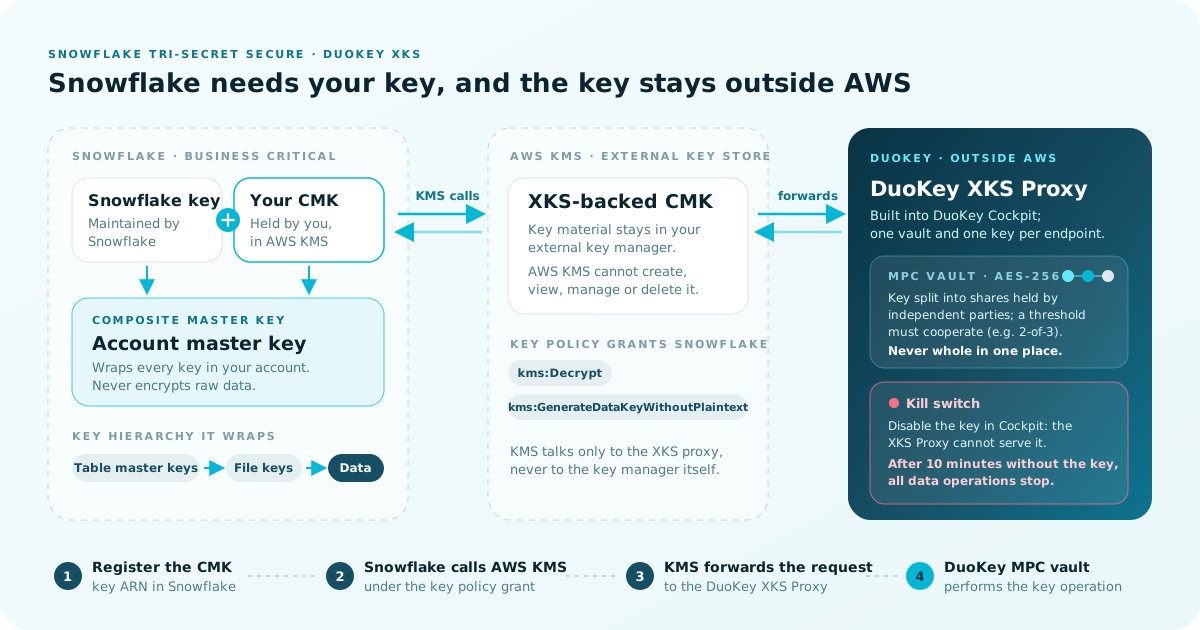
- The composite master key acts as the account master key. It wraps all the keys in your account hierarchy. For example, it wraps table master keys, which derive the file keys that encrypt the data.
- It is never used to encrypt raw data. Your CMK sits at the top of the hierarchy, not in the query path for every row.
The CMK lives in the platform-native service for your Snowflake account's cloud: AWS KMS on AWS, Cloud KMS on Google Cloud, Azure Key Vault on Azure (source). This guide covers the AWS case, because that is where an External Key Store can hold the key outside the provider.
What It Protects Against, and What It Does Not
Control over decryption
Snowflake states it directly: with a CMK, "you must release this key to decrypt data stored in your Snowflake account," and if the CMK in the composite master key hierarchy is revoked, "your data can no longer be decrypted by Snowflake" (Snowflake, Snowflake TSS).
Legal compulsion and third-party access
When Snowflake and your cloud provider both hold encryption keys to your data, either party could be compelled by a government order to provide access without your knowledge. That is the risk DuoKey's Tri-Secret Secure product is built around. Tri-Secret Secure means Snowflake cannot decrypt on its own. A standard AWS KMS CMK, however, still uses key material generated and used in HSMs that AWS KMS owns and manages (AWS). An XKS-backed CMK removes that too: AWS KMS "cannot create, view, manage, or delete your keys," and the key material never leaves your external key manager (same source).
Breach response
Snowflake lists this as a benefit of CMKs: if you experience a security breach, you can disable access to your key and halt all data operations in your Snowflake account (source). See Revocation for how that plays out.
What it does not do
- It does not replace authentication. While your key is available, anyone with valid Snowflake access can query data as usual, because the key is being released to Snowflake for normal operation. Strong authentication, including MFA, is still a separate control.
- It shifts availability risk to you. Snowflake requires that your key stays confidential, intact and continuously available. An invalid or unavailable key disrupts data operations until a valid key is available again (source).
Requirements and Prerequisites
Snowflake side
- Edition: Tri-Secret Secure requires Business Critical (or higher) (Snowflake TSS). Snowflake's editions overview lists it under Business Critical and Virtual Private Snowflake.
- Cloud: the CMK must be in the KMS of the cloud platform that hosts your Snowflake account. For an XKS-backed key, that means a Snowflake account on AWS.
- Role: only users with the ACCOUNTADMIN role can call
SYSTEM$REGISTER_CMK_INFO (reference).
- Hybrid tables: if you intend to create hybrid tables in an account where Tri-Secret Secure is or will be enabled, you must enable Dedicated Storage Mode (Snowflake TSS).
Vendor support for external key stores
Snowflake's documentation states that it supports integrating Tri-Secret Secure with AWS external key stores to store and manage a CMK outside AWS, and that it "officially tests and supports only Thales Hardware Security Modules (HSM) and Thales CipherTrust Cloud Key Manager (CCKM)" for this (Snowflake TSS). If you plan to use a different external key manager, including DuoKey, confirm the support position with Snowflake and DuoKey before production.
AWS and DuoKey side
DuoKey's Snowflake Tri-Secret Secure getting-started guide lists:
- DuoKey Cockpit access with an XKS Proxy deployed
- A DuoKey MPC vault with an AES-256 key for the Snowflake CMK
- An AWS account with KMS permissions in the same region as your Snowflake account
- AWS CLI or console access for KMS operations
AWS adds its own constraints for external key stores: symmetric encryption keys only, no automatic key rotation, no multi-Region keys, up to 10 custom key stores per account and Region, and no support in the China (Beijing) and China (Ningxia) Regions. AWS recommends placing the external key store components in the Region closest to your external key manager, with a round-trip time of 35 ms or less where possible (AWS).
Keeping the CMK Outside AWS: XKS with DuoKey MPC
How XKS works
An external key store is an AWS KMS custom key store backed by an external key manager you own and manage outside AWS. AWS KMS never talks to that key manager directly; it talks only to an XKS proxy, which forwards requests and returns responses. Each KMS key in the store is tied to an external key, a 256-bit AES key in your key manager (AWS).
Data protected by an XKS-backed key is encrypted twice: first by AWS KMS with key material specific to that KMS key, then by your external key manager with your external key. As a result, "neither AWS KMS nor the owner of the external key material can decrypt double-encrypted ciphertext alone" (same source).
The XKS setup itself is covered in depth in our AWS XKS implementation guide. This guide only covers what is specific to Snowflake.
Where DuoKey fits
The DuoKey XKS Proxy is built into DuoKey Cockpit and implements the AWS XKS proxy specification. Each XKS endpoint is bound to one vault and one key selected at deployment (DuoKey docs: AWS XKS overview). For Snowflake, that vault is a DuoKey MPC vault:
Snowflake -> AWS KMS (XKS-backed CMK) -> DuoKey XKS Proxy -> DuoKey MPC vault
With MPC, key material is split into shares held by independent parties, and operations require a threshold of them to cooperate (for example 2-of-3 or 3-of-5). The full key never exists in one place, and no single administrator can use it alone (DuoKey docs). This is the root key material that AWS KMS can use but not complete on its own (DuoKey for AWS XKS).
| Standard AWS KMS CMK | DuoKey XKS MPC CMK |
|---|
| Where key material is held | HSMs owned and managed by AWS KMS | DuoKey MPC vault, outside AWS |
| Who can create, view or delete it | AWS KMS manages it | Only you; AWS KMS cannot |
| Single point of compromise | One key in one service | Shares across independent parties |
| Revocation levers | KMS key state, key policy | KMS key state, key policy, key store connection, DuoKey Cockpit |
| Audit trail | AWS CloudTrail | AWS CloudTrail plus DuoKey Cockpit logs |
Sources: AWS, DuoKey docs.
Step-by-Step: Register and Activate Your CMK
Snowflake documents two ways to activate: self-service, where you activate with SYSTEM$ACTIVATE_CMK_INFO after a waiting period (Snowflake TSS self-service), and self-registration with Support activation, where you register the key yourself and then ask Snowflake Support to enable Tri-Secret Secure (Snowflake TSS). Steps 1 to 6 are the same for both.
Step 1: Deploy the XKS endpoint and MPC key
In DuoKey Cockpit, deploy an AWS XKS endpoint bound to an AES-256 key in your MPC vault, confirm the health check responds, and note the external key ID (DuoKey docs).
Step 2: Create the XKS-backed CMK in AWS KMS
Create and connect the external key store, then create the KMS key (DuoKey docs):
aws kms create-custom-key-store \
  --custom-key-store-name "<key-store-name>" \
  --custom-key-store-type EXTERNAL_KEY_STORE \
  --xks-proxy-uri-endpoint "https://<xks-proxy-host>" \
  --xks-proxy-uri-path "<xks-proxy-path>" \
  --xks-proxy-connectivity PUBLIC_ENDPOINT \
  --xks-proxy-authentication-credential \
    AccessKeyId=<access-key-id>,RawSecretAccessKey=<secret-access-key>

aws kms connect-custom-key-store --custom-key-store-id <key-store-id>

aws kms create-key \
  --origin EXTERNAL_KEY_STORE \
  --custom-key-store-id <key-store-id> \
  --xks-key-id <external-key-id>
For production, AWS also supports VPC endpoint service connectivity instead of a public endpoint (AWS). Record the key ARN returned by create-key.
Step 3: Register the CMK in Snowflake
USE ROLE ACCOUNTADMIN;
SELECT SYSTEM$REGISTER_CMK_INFO('<key-arn>');
On AWS, the function takes the key ARN, plus an optional argument to use a private connectivity endpoint (reference). In the self-service flow, Snowflake then emails account administrators who have a validated email address to tell them when they can activate (source).
Step 4: Check registration status
SELECT SYSTEM$GET_CMK_INFO();
Right after registration, the output states that the CMK "is pre-registered for Tri-Secret Secure" (reference).
Step 5: Generate and apply the key policy
SELECT SYSTEM$GET_CMK_CONFIG();
On AWS, this returns a key policy statement that allows Snowflake to use your CMK. Snowflake's documented example grants kms:Decrypt and kms:GenerateDataKeyWithoutPlaintext (reference):
{
  "Sid": "Allow use of the key by Snowflake",
  "Effect": "Allow",
  "Principal": { "AWS": "<snowflake-principal-from-output>" },
  "Action": ["kms:Decrypt", "kms:GenerateDataKeyWithoutPlaintext"],
  "Resource": "<key-arn>"
}
Add the exact statement your account returns to the KMS key policy. Do not copy an example, because the principal is specific to your account.
Step 6: Verify connectivity
SELECT SYSTEM$VERIFY_CMK_INFO();
This verifies your CMK configuration (reference). With XKS, a successful check means Snowflake reached the key through AWS KMS and the DuoKey XKS Proxy (DuoKey docs).
Step 7: Activate
Self-service: wait 72 hours after registration, then run:
SELECT SYSTEM$ACTIVATE_CMK_INFO();
If you try to activate during the waiting period, you get an error telling you to wait. Activation starts rekeying, which "can complete in under an hour, but might require up to 24 hours," and Snowflake emails administrators when it finishes. You can keep using your account during rekeying (source).
Support activation: contact Snowflake Support and ask them to enable Tri-Secret Secure for the specific account (source).
SYSTEM$GET_CMK_INFO returns "...is being activated..." while rekeying runs, and "...is activated..." once your account is using Tri-Secret Secure with your CMK.
Revocation: The Kill Switch
What Snowflake does when the key disappears
Snowflake tolerates temporary key unavailability of up to 10 minutes, for issues such as network failures. After 10 minutes, if the key is still unavailable, "all data operations in your Snowflake account will cease completely." They restart when access to the key is restored (source).
Your revocation levers with XKS
With an XKS-backed CMK, there are several places to cut Snowflake off:
| Lever | Where | Documented effect |
|---|
| Disable the key in DuoKey Cockpit | DuoKey MPC vault | The XKS Proxy can no longer serve key operations (DuoKey docs) |
| Disconnect the external key store | AWS KMS | All KMS keys in the store become unusable right away, subject to eventual consistency (AWS) |
| Disable the KMS key | AWS KMS | All cryptographic operations fail until it is re-enabled (DuoKey docs) |
| Remove Snowflake's statement from the key policy | AWS KMS | Snowflake loses permission to use the key (DuoKey docs) |
DuoKey's getting-started guide shows the result after the external key store is disconnected: Snowflake returns "Access is denied to the customer managed key (CMK) for this account" and no data can be queried. Reconnecting restores access (DuoKey docs).
Temporary versus permanent
AWS draws the line clearly. If you temporarily revoke access to your external key manager, AWS loses all access to your keys until you restore it. If you permanently revoke it, all ciphertext encrypted under a KMS key in that store becomes unrecoverable (AWS). Snowflake says the same from its side: if your key is tampered with or destroyed, all existing data in the account becomes unreadable until the key is restored (source).
Deliberate, permanent revocation is how you crypto-shred a Snowflake account. Accidental loss of the external key has the same result, which is why backup and recovery of the MPC key is part of the design, not an afterthought.
Rotating or Changing the CMK
Snowflake's own rotation continues
Snowflake keeps rotating its internal account master key every 30 days. When your CMK gets a new version through the cloud provider's automatic rotation, Snowflake picks it up at the next account master key rotation (source).
Why XKS keys use the "change CMK" path
AWS KMS does not support automatic key rotation for keys in custom key stores (AWS). So the provider-rotation path, including SYSTEM$ACTIVATE_CMK_INFO('REKEY_SAME_CMK'), is designed for automatically rotated CMKs, which an XKS key isn't. For XKS keys, rotation means registering a new CMK. DuoKey documents this flow (DuoKey docs):
- Create a new AES-256 key in the DuoKey MPC vault.
- Create a new XKS-backed KMS key that points to it.
- Register the new key ARN with
SYSTEM$REGISTER_CMK_INFO and repeat the policy and verification steps.
- Activate after the waiting period, or coordinate the change with Snowflake Support.
During a change, SYSTEM$GET_CMK_INFO returns a message containing "...is being rekeyed..." (source). Snowflake allows only one registered CMK at a time. If registration fails because a different CMK is already registered, call SYSTEM$DEREGISTER_CMK_INFO as prompted.
Do not retire the old key early
Snowflake uses the old CMK until rekeying completes, so do not remove access to it until you receive the completion email. For a manual key change, don't revoke access to or delete the current CMK until Snowflake Support confirms it is safe (source).
To turn Tri-Secret Secure off completely, SYSTEM$DEACTIVATE_CMK_INFO creates a new account master key, retires the composed account master key and starts rekeying (reference).
Operating and Monitoring the Key Path
Once Tri-Secret Secure is active, the DuoKey XKS Proxy, the MPC vault and the network path between them and AWS KMS are production dependencies for your Snowflake account. With external key stores, you, not AWS, are responsible for the availability, durability and latency of key operations. AWS strongly recommends CloudWatch alarms on external key stores (AWS).
DuoKey's monitoring guide and Snowflake guide recommend watching:
| What | Where |
|---|
XKS proxy latency (XksProxyLatency) | Amazon CloudWatch, AWS/KMS namespace |
XKS proxy credential age (XksProxyCredentialAge) | Amazon CloudWatch |
| KMS key state (disabled, pending deletion) | AWS KMS console, CloudTrail |
| Unexpected Encrypt or Decrypt calls | AWS CloudTrail |
| XKS endpoint health and request activity | DuoKey Cockpit |
| MPC vault node and quorum status | DuoKey Cockpit |
Use the 72-hour waiting period to test your revocation and recovery procedures, set up alerting, and make sure your operations team knows Snowflake now depends on this path (DuoKey docs).
Common Challenges and Troubleshooting
SYSTEM$VERIFY_CMK_INFO fails with "Access is denied"
Snowflake's documented AWS failure message lists four causes: the CMK access permissions granted to Snowflake have been revoked, the CMK is disabled, the CMK is scheduled for deletion, or the wrong CMK was specified (reference). Check the ARN, the key state and the key policy statement from SYSTEM$GET_CMK_CONFIG.
Verification fails even though the key policy is correct
With XKS, check the rest of the chain: is the external key store connected (aws kms describe-custom-key-stores), is the DuoKey XKS Proxy health check responding, and is the MPC vault quorum available (DuoKey docs). A key store in the CONNECTED state only means a connection succeeded. It does not guarantee the components are working properly (AWS).
Activation returns an error telling you to wait
You are still inside the 72-hour window after registration. Check the earliest activation date with SYSTEM$GET_CMK_INFO and wait (source).
Registration fails because another CMK exists
Only one CMK can be registered at a time. Call SYSTEM$DEREGISTER_CMK_INFO, then register again (source).
Queries stop after activation
If the key has been unavailable for more than 10 minutes, Snowflake halts data operations. Work back through the chain: KMS key state, key store connection state, XKS Proxy health, MPC vault quorum, and CloudTrail for KMS errors. If you still need help, contact Snowflake Support with the output of SYSTEM$GET_CMK_INFO (DuoKey docs).
High XKS latency
AWS recommends a round-trip time of 35 ms or less between the external key store components and your external key manager (AWS). Deploy the XKS endpoint close to the AWS Region your Snowflake account runs in.
FAQ
Q: Which Snowflake edition do I need?
Business Critical or higher (Snowflake TSS).
Q: Does the CMK encrypt my data directly?
No. The composite master key acts as the account master key and wraps the keys below it. It is never used to encrypt raw data (Snowflake TSS).
Q: Can I use an XKS-backed key if my Snowflake account runs on Azure or Google Cloud?
No. The CMK must live in the KMS of the cloud platform that hosts your Snowflake account, and External Key Store is an AWS KMS feature (source).
Q: Does Snowflake officially support DuoKey as an external key manager?
Snowflake's documentation says it supports integrating Tri-Secret Secure with AWS external key stores, and that it officially tests and supports only Thales HSM and Thales CCKM for this (Snowflake TSS). DuoKey implements the AWS XKS proxy specification, so Snowflake sees a standard AWS KMS key. Confirm the support position with Snowflake and DuoKey for your account before production.
Q: What happens if the DuoKey XKS Proxy goes down?
Snowflake tolerates up to 10 minutes of key unavailability. After that, all data operations in the account stop until the key is reachable again (source). Deploy the proxy and MPC vault for high availability.
Q: Is revocation reversible?
Temporary revocation, such as disconnecting the key store or disabling the key, is reversible: restore access and operations resume. If the external key is permanently lost or deleted, the ciphertext is unrecoverable (AWS).
Q: How do I rotate an XKS-backed CMK?
AWS doesn't support automatic rotation for external key store keys, so create a new MPC key and XKS-backed KMS key, register it, and activate it or coordinate the change with Snowflake Support. Keep the old key available until rekeying completes (DuoKey docs, Snowflake).
Q: Can I keep using Snowflake while it rekeys?
Yes. In the self-service flow, you can continue to use your account during rekeying (source).
Q: Does Tri-Secret Secure stop someone who logs in with stolen credentials?
Not by itself. While your key is available, authenticated users can query data as usual. What it gives you is the ability to halt all data operations by revoking the key once you detect a breach (source).
Conclusion: Tri-Secret Secure Readiness Checklist
Tri-Secret Secure turns Snowflake encryption into a model where your key is required. Backing that key with DuoKey XKS MPC means the key material also stays outside AWS. The trade-off is that you now own the availability of the key path, so treat it as production infrastructure from day one.
To see how DuoKey delivers this for your Snowflake account, visit the DuoKey Tri-Secret Secure for Snowflake page, or browse all integrations.
References