
Product demo
Secure Exchange in 57 seconds
Send from Outlook, open without an account, revoke and prove.
Under your control: every message
Secure Exchange adds a secure channel to the mailbox your people already use, for the messages that must not travel in clear.
One click in Outlook
A Secure send button in the compose window. No other app, no extra sign-in.
Your keys, your HSM
Each package has its own key, wrapped by a key that stays in your vault or HSM.
Revoke and prove
Status per recipient, revocation at any time and a signed receipt of every event.
Sealed before it leaves Outlook.
When Secure send is on, the add-in uploads the message and every attachment encrypted, removes the attachments from the email and sends the recipient a notification instead. Your own Exchange sends it: SPF, DKIM, DMARC and the Sent Items copy stay as they are.
- AES-256-GCM in 4 MiB chunks, one 256-bit key per package.
- Fail closed: if anything goes wrong, the send is blocked and the draft is restored.
Your policy decides, not the sender's memory.
Rules per sensitivity label or recipient domain make secure sending mandatory, advised or optional. Outlook also warns before a plain send to an external recipient with a sensitive label, to a new domain, to a look-alike domain or with attachments over the Exchange limit.
- Microsoft Purview sensitivity labels are read in Outlook.
- Secure by default can be switched on for the whole organisation.
Revoke at any time, for one or for all.
Revoking a package destroys its data key: nobody can open it again, the sender included. You can also revoke a single recipient, or unlock one who typed the wrong code five times.
- Availability from 1 to 365 days, 14 by default.
- Expired and revoked packages are purged after the retention period.
Every opening on the record.
Sending, notification, code verified, opening, download, reply and revocation are logged per recipient. The receipt is signed with HMAC-SHA256 and can be verified later; every event also goes to your SIEM.
- Proof of delivery and of opening, downloadable from Outlook.
- The proof log is kept after the content is purged.
How it works
From Outlook to the recipient, and back
The sender stays in Outlook. The recipient needs only a browser and their mailbox. The content sits encrypted in the DuoKey Cockpit and never travels as an email attachment.
- 01The sender writes in Outlook and turns on Secure send, or a rule turns it on
- 02The add-in encrypts and uploads the message and files, up to 50 GB
- 03Exchange delivers a notification with a link that carries no secret
- 04The recipient proves their mailbox with an 8-digit code, or a passphrase agreed with the sender
- 05They read, download and reply securely with files, in the portal
- 06The sender follows each recipient in Outlook, revokes or downloads the proof
In Outlook
Built for the people who send
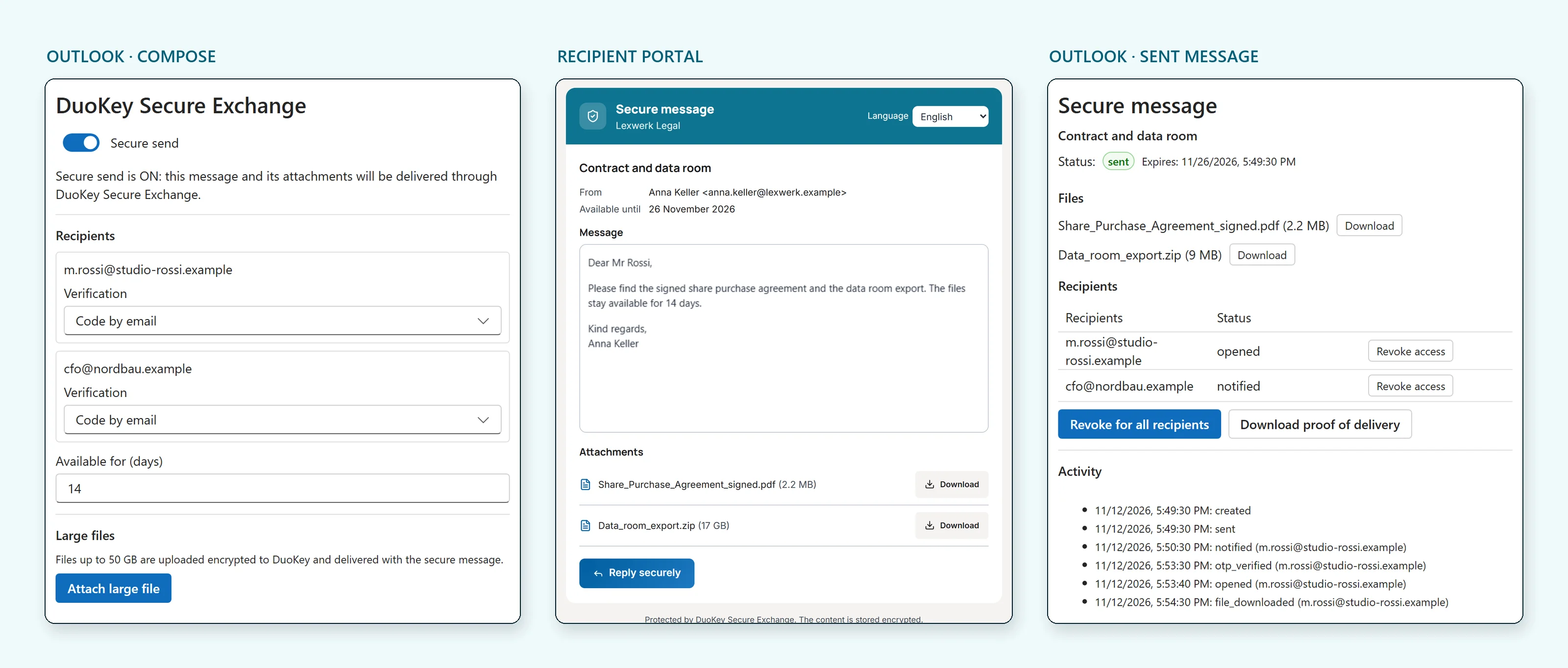
The add-in is deployed by the administrator and is always there: a Secure send button in the compose ribbon, a task pane for options and large files, and a read pane on sent messages.
- Personal and shared mailboxes, with delegates
- Verification per recipient: code by email or passphrase
- Large files with progress, pause and resume
- Internal recipients can read with Microsoft sign-in instead of a code
- User interface in English, French and Dutch
Keys and security
The key that opens everything stays with you
Every package gets its own random 256-bit key. That key is wrapped by a key-encryption key created in your vault or HSM, and only the wrapped form is stored. Without your HSM, the stored data is unreadable.
- AES-256-GCM per 4 MiB chunk, with the position bound into each chunk: no reordering, no truncation
- The portal link holds no secret: opening needs the code or the passphrase
- 8-digit codes valid 10 minutes, 5 attempts then the recipient is locked
- One answer for every refusal, so addresses cannot be probed
- Every table isolated per tenant at database level
Fits your Microsoft 365 environment
Secure Exchange runs in the DuoKey Cockpit and plugs into the tools your organisation already operates.
- Outlook add-in deployed centrally from the Microsoft 365 admin center
- Single sign-on with Microsoft Entra ID, no extra password
- Keys in your vault or HSM, events in your SIEM
Where it runs
Secure Exchange is a feature of the DuoKey Cockpit and follows its operating modes. The key that protects every package stays in the vault or HSM you choose.
FAQ
Secure Exchange, frequently asked questions
Secure Exchange sends sensitive messages and large files from Outlook, encrypted with keys held in your own vault or HSM. External recipients open them in a web portal after proving control of their mailbox, without an account and without installing anything.
No. The recipient gets a notification email with a link, asks for an 8-digit code sent to the same mailbox (or types a passphrase agreed with the sender), and reads the message in the browser. They can download the files and reply securely with files.
50 GB per package by default, up to 1 TB if your policy allows. Files are uploaded in encrypted 4 MiB chunks, with pause and resume.
Each package has its own 256-bit data key, wrapped by a key-encryption key that Secure Exchange creates in your vault or HSM, for example Securosys. Only the wrapped key is stored. Revoking a package destroys its data key.
Rules per sensitivity label or recipient domain can make secure sending mandatory; the sender then cannot turn it off. Outlook also warns before a plain send to an external recipient with a sensitive label, to a new or look-alike domain, or with attachments over the Exchange limit.
Yes. The notification leaves through your Exchange Online, so SPF, DKIM, DMARC and the Sent Items copy work as usual. Only the content and the attachments go through Secure Exchange.
Yes. Every sending, notification, code check, opening, download, reply and revocation is logged per recipient. The receipt is signed with HMAC-SHA256 and can be verified; the events are also forwarded to your SIEM.
Book a demo. We show Secure Exchange with Outlook and a vault or HSM, and look at the labels, domains and file sizes you need to cover.
Sensitive mail and large files. Your keys, your proof.
We show you Secure Exchange in Outlook and the recipient portal, in your own Microsoft 365 test tenant if you wish.