If you run Nextcloud yourself or have it hosted by a European provider, you have answered the hosting question. A second question remains open: who can decrypt the documents? In a standard installation, the answer is the server that displays them. A vulnerability in the web platform, a curious administrator or an order served on the hosting provider is then enough to expose every document.
Nextcloud offers two built-in types of encryption. This guide shows where the key lives in each, what a compromised server sees, whether collaborative editing in the browser survives, and what the third option looks like: taking encryption out of Nextcloud and keeping the master key in your organization's own HSM.
Table of Contents
- The Three Questions That Decide Confidentiality
- Server-Side Encryption
- End-to-End Encryption
- Does Nextcloud Enterprise Change Anything?
- The Third Option: Keys in Your Own HSM
- Comparison Table
- What Remains Visible?
- Which Option for Which Folder?
- Sources
The Three Questions That Decide Confidentiality
Any encryption model can be classified with three questions:
- Where is the master key? On the server, on the users' devices or in a separate HSM.
- Where does plaintext exist? Only on the device, on the server as well, or in a separate, isolated zone.
- What is lost? Usually it is collaborative editing in the browser, traded for stronger confidentiality.
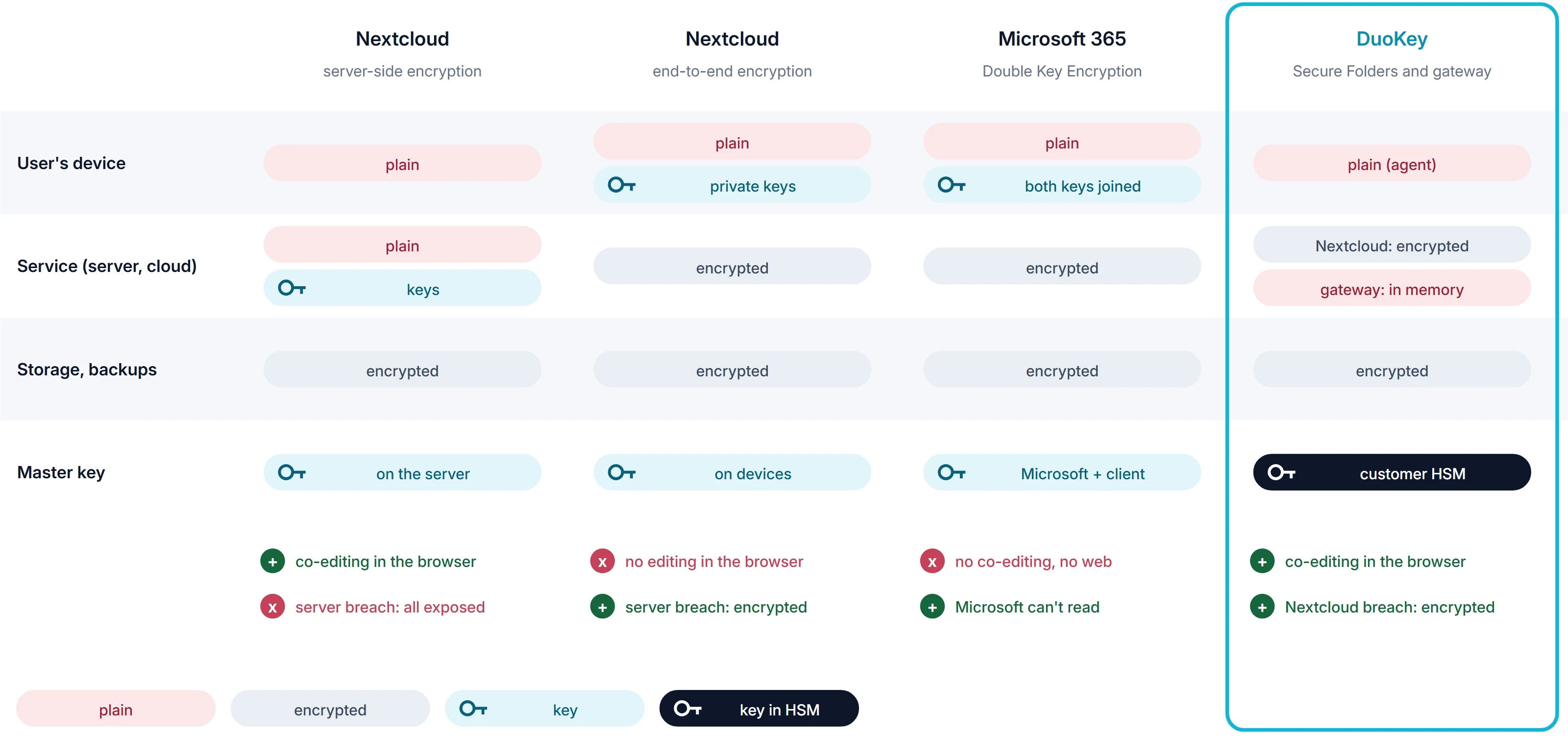
Figure 1. Where keys and plaintext live, depending on the encryption model.
The figure sums up the dilemma. Server-side encryption keeps collaborative editing but leaves the keys with the server. End-to-end encryption takes the keys away from the server, but also takes away editing in the browser. Microsoft 365 Double Key Encryption has the same limitation in the Microsoft ecosystem.
Server-Side Encryption
Nextcloud server-side encryption encrypts files before they are written to storage. In the default mode (master key mode), the key is on the server, protected by an instance secret. The Nextcloud documentation is clear on this point: server-side encryption does not protect data against a compromised Nextcloud server or a malicious administrator [1]. Its main purpose is to protect external storage, such as object storage at a third party.
What it does well:
- It is transparent: previews, search and Nextcloud Office keep working.
- A stolen disk or a backup taken without the server is protected, as long as the keys are not on the same system.
What it does not do:
- Anyone who takes over the server, for example through a PHP vulnerability or a vulnerable app, can read every document.
- The administrator and the hosting provider can decrypt.
- File names, previews and the search index are not encrypted [3].
The threat is real. On 20 October 2026, PHP released critical security fixes; CERT-EU recommended taking servers running PHP applications offline until they were updated, and Nextcloud released a version of its All-in-One installation with the fixed dependencies.
End-to-End Encryption
With end-to-end encryption (E2EE), the users' clients do the encryption. The private keys stay on the devices, and the server sees only ciphertext. Against a compromised server and a curious administrator, this is the strongest of the built-in options. File names are encrypted as well, and the design provides for an HSM to issue keys [5].
The price is collaboration. Since Nextcloud Hub 10, end-to-end encrypted folders can be browsed and downloaded in the browser, but not edited in Nextcloud Office [2]. For teams that work on documents together every day, this is usually the deal breaker.
Does Nextcloud Enterprise Change Anything?
Nextcloud Enterprise offers early security fixes and 5 to 10 years of support [6], while a major version of the Community edition is maintained for about one year [4]. That shortens the window in which a known vulnerability can be exploited. It does not change the key model: even with Enterprise and server-side encryption, the server can decrypt.
In short: Enterprise lowers the likelihood of a compromise. A key outside the server limits its consequences. The two complement each other.
The Third Option: Keys in Your Own HSM
The third option takes encryption out of Nextcloud without giving up editing in the browser. This is how DuoKey SecureFolder works:
- The files of a protected folder are stored in Nextcloud in the encrypted DKSF format (AES-256-GCM). Nextcloud holds no key.
- The master key (KEK) stays in the organization's HSM or vault. Each folder has its own versioned key, stored only wrapped by the KEK.
- For editing in the browser, a DuoKey gateway sits between Nextcloud and Collabora Online. It fetches the folder key for an authorized user, decrypts in memory and re-encrypts on every save.
- On Windows and macOS, an agent mounts the folder so that local applications see plaintext, while the sync client transfers only ciphertext.
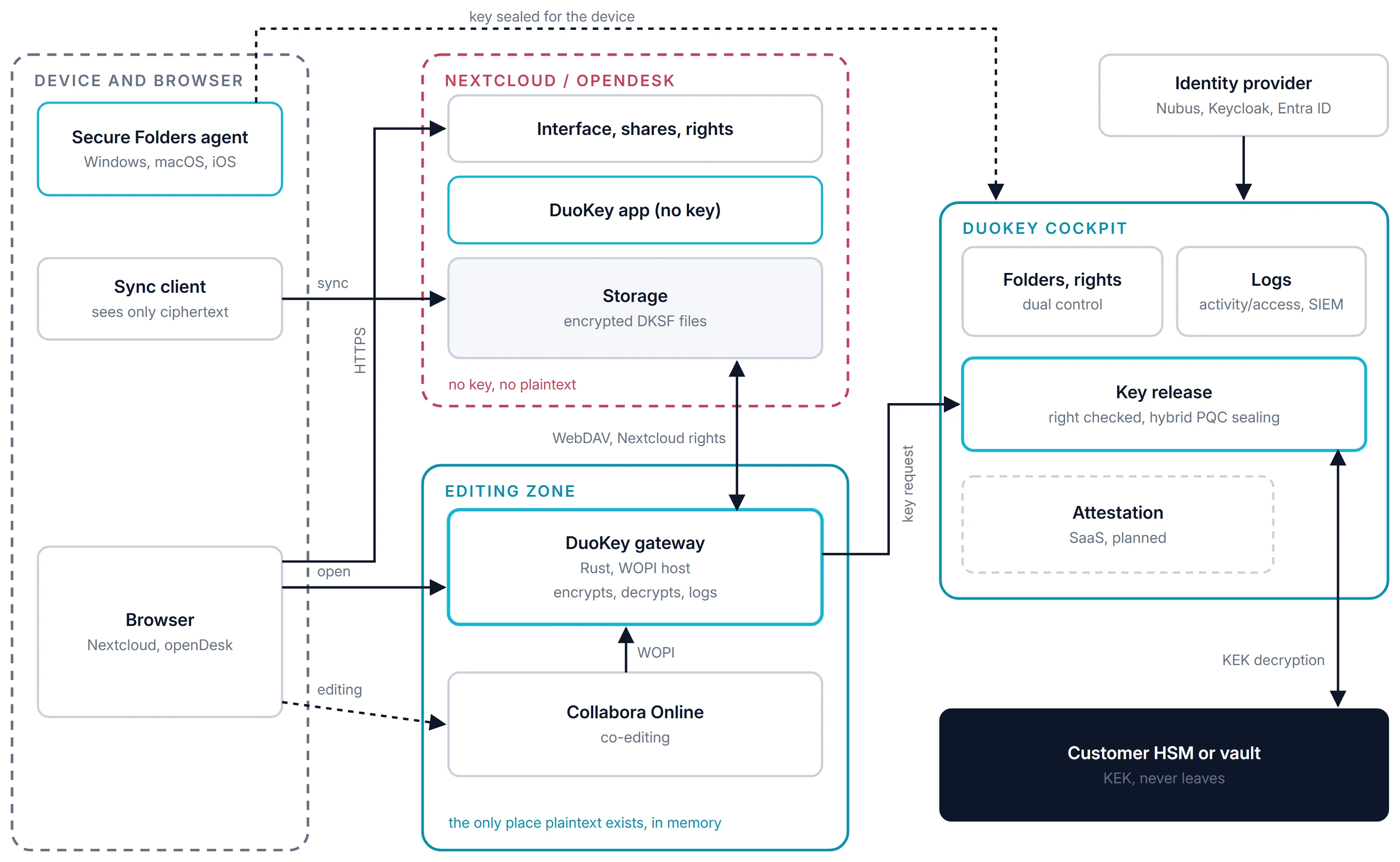
Figure 2. Components and trust zones. Nextcloud sees only ciphertext; plaintext exists only in the editing zone, in memory, and on the device.
Two independent checks take place before every open: Nextcloud checks the share, and DuoKey Cockpit checks the right to the key. If either is missing, the document stays closed. The article Encrypted Co-Editing with Collabora Online describes how the gateway works technically.
Comparison Table
| Community, server-side | Enterprise, server-side | Nextcloud end-to-end | With SecureFolder |
|---|
| Where the key lives | On the server, protected by an instance secret | Same | On the users' devices | KEK in the organization's HSM |
| Server administrator can decrypt | Yes, in master key mode [1] | Yes | No | No |
| Compromised server | Documents exposed [1] | Documents exposed | Ciphertext only | Ciphertext only |
| Collaborative editing in the browser | Yes | Yes | No: browse and download only [2] | Yes, through the gateway |
| File names, previews, search index | Not encrypted [3] | Not encrypted | Names encrypted | Names in plaintext (encryption planned); no previews, no index |
| HSM | Not documented for server-side encryption | Not documented | Provided for in the design [5] | Yes, for the KEK |
| Security fixes | Major version maintained for one year [4] | Early fixes, 5 to 10 years of support [6] | Depends on the edition | Independent of Nextcloud |
| Log of every key release and every open | No | No | No | Yes, with forwarding to the SIEM |
What Remains Visible?
None of these options encrypts everything. With SecureFolder, Nextcloud still sees the names, sizes, dates and shares of files, but not their content; file name encryption is planned. Protected folders have no previews and no search index, because both would require plaintext on the server.
The editing zone is also a place where plaintext exists, in memory and for the duration of a request. In on-premises or hybrid deployments, the organization runs this zone itself. A compromise of the gateway or of Collabora affects the documents opened during the compromise, not the others.
Which Option for Which Folder?
| Folder | Recommendation |
|---|
| General storage, templates, public material | Server-side encryption is enough; previews and search are kept |
| Personal, rarely shared confidential files | End-to-end encryption |
| Confidential documents that teams work on together (HR, legal, procurement, management) | Keys in your own HSM, with editing through the gateway |
The decision is made per folder, not per instance. An organization can use all three models side by side.
Sources
- Nextcloud, Administration Manual: server-side encryption. docs.nextcloud.com
- Nextcloud Hub 10 announcement (end-to-end encryption in the browser). help.nextcloud.com
- Nextcloud, server-side encryption details. docs.nextcloud.com
- Nextcloud, release schedule. docs.nextcloud.com
- Nextcloud, end-to-end encryption. nextcloud.com/endtoend
- Nextcloud Enterprise. nextcloud.com/enterprise
Sources checked 8 to 10 November 2026.