In Nextcloud, collaborative editing in the browser and end-to-end encryption have so far been mutually exclusive: an editor such as Collabora Online needs the document in plaintext, and an end-to-end encrypted folder does not give it to the editor. This article shows a third way, implemented by DuoKey SecureFolder: a WOPI gateway that decrypts the document only in memory, while Nextcloud stores nothing but ciphertext and the master key stays in the organization's HSM.
It is written for architects, administrators and security officers in the Nextcloud and openDesk community who want to understand what happens technically and where the limits are.
Table of Contents
- WOPI in Two Minutes
- The Gateway as WOPI Host
- The Path of a Document, Step by Step
- Several Editors, One Session
- Security Decisions in Detail
- Two Independent Checks
- Limits and Residual Risks
- Compatibility
- Sources
WOPI in Two Minutes
WOPI (Web Application Open Platform Interface) is the protocol an online editor uses to fetch a file from storage and write it back. It has two roles:
- The WOPI client is the editor: Collabora Online or OnlyOffice Docs.
- The WOPI host serves the file: normally Nextcloud itself, with the Nextcloud Office app.
The editor essentially calls four operations on the host: CheckFileInfo (metadata and permissions), GetFile (read content), PutFile (write content) and the lock operations LOCK, UNLOCK, REFRESH_LOCK, GET_LOCK. The editor publishes the addresses it offers and the keys it signs its calls with in its discovery document.
The key point: whoever is the WOPI host sees the document in plaintext. In a standard installation, that is Nextcloud.
The Gateway as WOPI Host
The DuoKey gateway takes over the WOPI host role. Nextcloud remains the storage and permission manager, but sees only ciphertext.
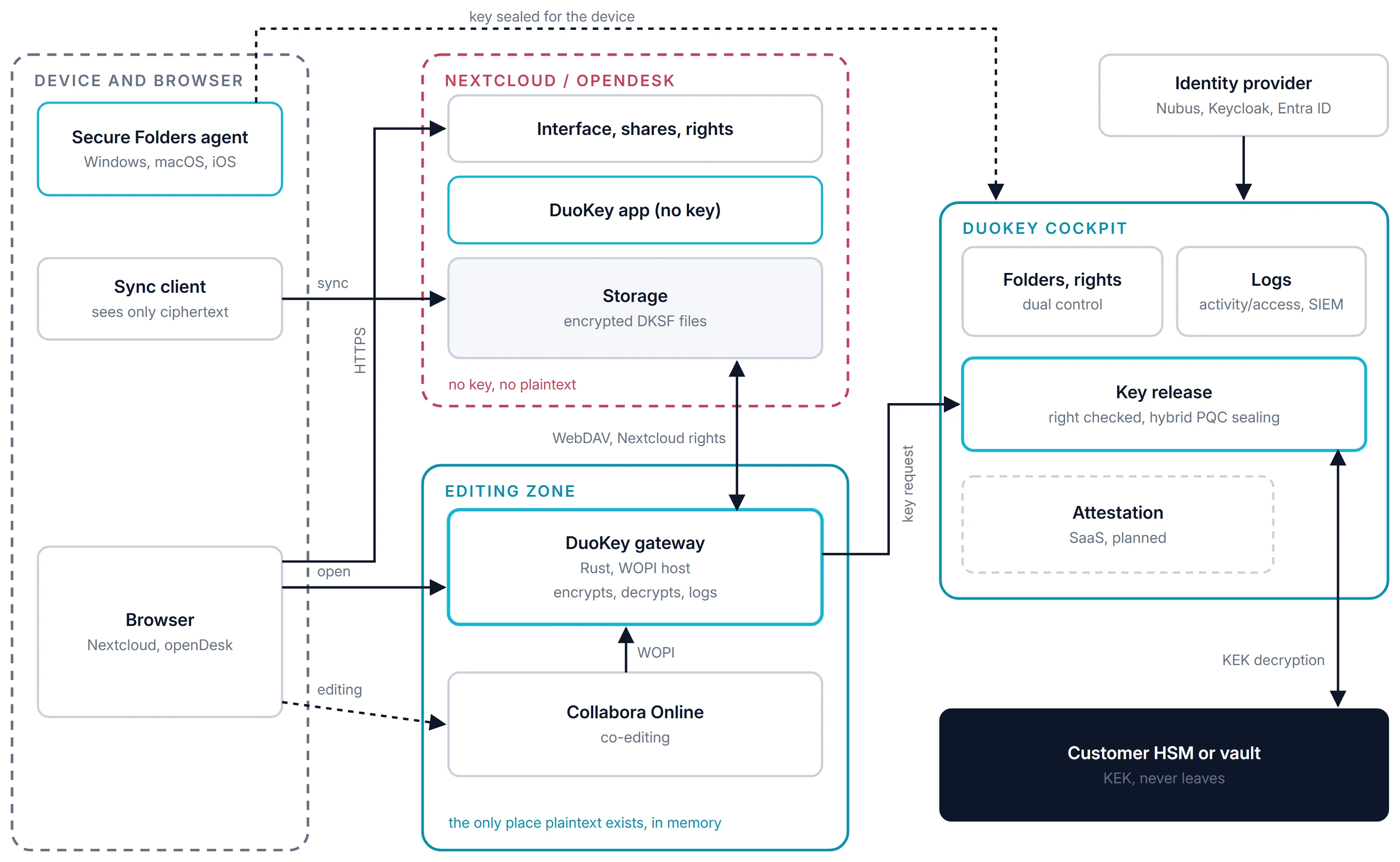
Figure 1. Components and trust zones. On the server side, plaintext exists only in the editing zone, in memory.
The gateway is written in Rust and built from independent components: a storage connector (WebDAV for Nextcloud and openDesk), a key resolver (DuoKey Cockpit), a codec for the DKSF file format, sessions, sealed WOPI tokens, discovery and proof verification, locks and an access log. The same components serve any storage and any editor.
The Path of a Document, Step by Step
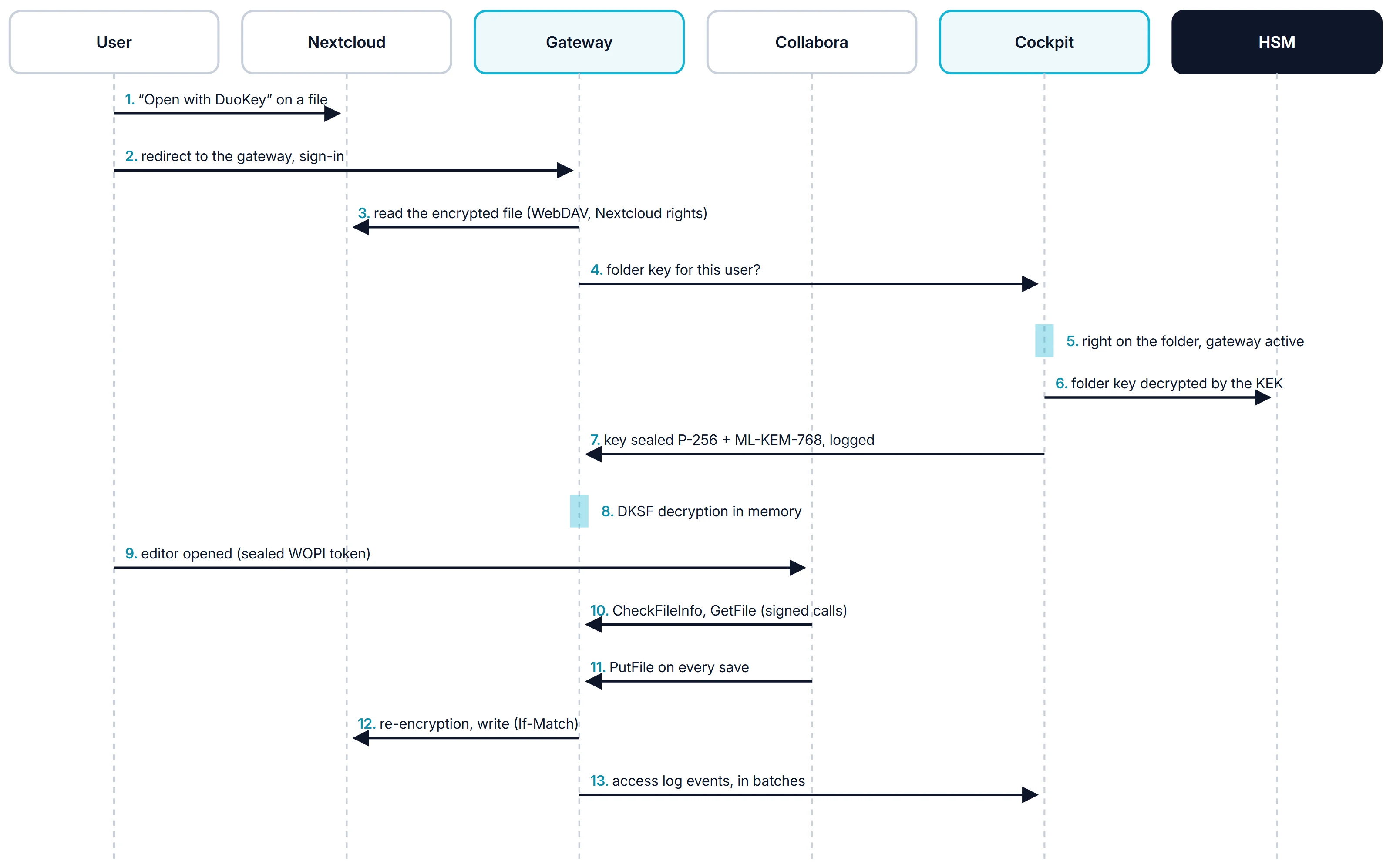
Figure 2. Opening, co-editing and saving a document from a protected folder.
- In Nextcloud, the user selects "Open with DuoKey".
- The user is redirected to the gateway and signs in with OpenID Connect, for example through openDesk's Keycloak.
- The gateway reads the encrypted file over WebDAV with the user's token, that is, with the user's own Nextcloud permissions.
- It asks Cockpit for the folder key for this user.
- Cockpit checks the right to the folder and whether the gateway is active.
- The folder key is decrypted in the HSM by the KEK.
- Cockpit seals it for the gateway, hybrid with P-256 and ML-KEM-768, and logs the release.
- The gateway decrypts the DKSF file in memory.
- The editor is opened with a sealed WOPI token.
- Collabora calls
CheckFileInfo and GetFile, with signed calls.
- Every save is followed by
PutFile.
- The gateway re-encrypts and writes back with
If-Match.
- The events are sent in batches to the Cockpit access log.
Several Editors, One Session
Each person who opens a document gets their own WOPI token, bound to one file and one session, sealed and time-limited. Their permissions are checked individually. The file identifier in the WOPISrc is a keyed hash (HMAC) of the storage path: stable, so that all editors of the same file land in the same Collabora session, and not reversible, so that it does not reveal the path.
Anyone who has only a read right on the key or only a read share in Nextcloud opens the editor in read-only mode; their saves and locks are rejected.
Security Decisions in Detail
| Topic | Decision |
|---|
| WOPI token in the URL | The protocol requires it. The token is sealed with AES-256-GCM, reveals neither the user nor the path, is bound to one file and one session, and expires (after 4 hours by default). It never contains the storage credentials; those stay in the server-side session. |
| Editor signatures | Proof signatures (X-WOPI-Proof, X-WOPI-ProofOld) are mandatory by default, with key rotation. A stolen token alone is not enough to call the WOPI routes. |
| No silent overwrites | Saves use If-Match with the last ETag read. If a desktop sync has changed the file in the meantime, the gateway responds with 409 instead of overwriting. |
| Locks | WOPI locks per file, with a 30-minute expiry. |
| Plaintext | Exists only in memory, for the duration of a request, and is zeroed when released. |
| Outbound connections | No redirects, size limits, destination addresses set by the administrator. |
| Leak controls | Export, printing, copying and downloading blocked in the editor; named watermark. |
| Access log | Opens, saves, encrypted uploads and denials are reported to Cockpit, never the file content. Logging never blocks a WOPI call. |
Two Independent Checks
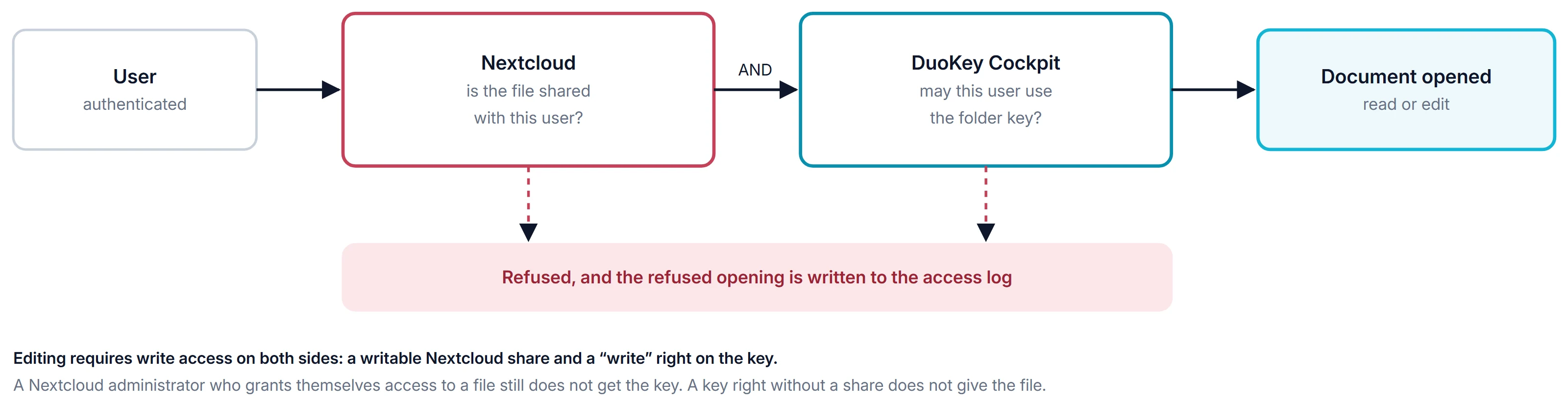
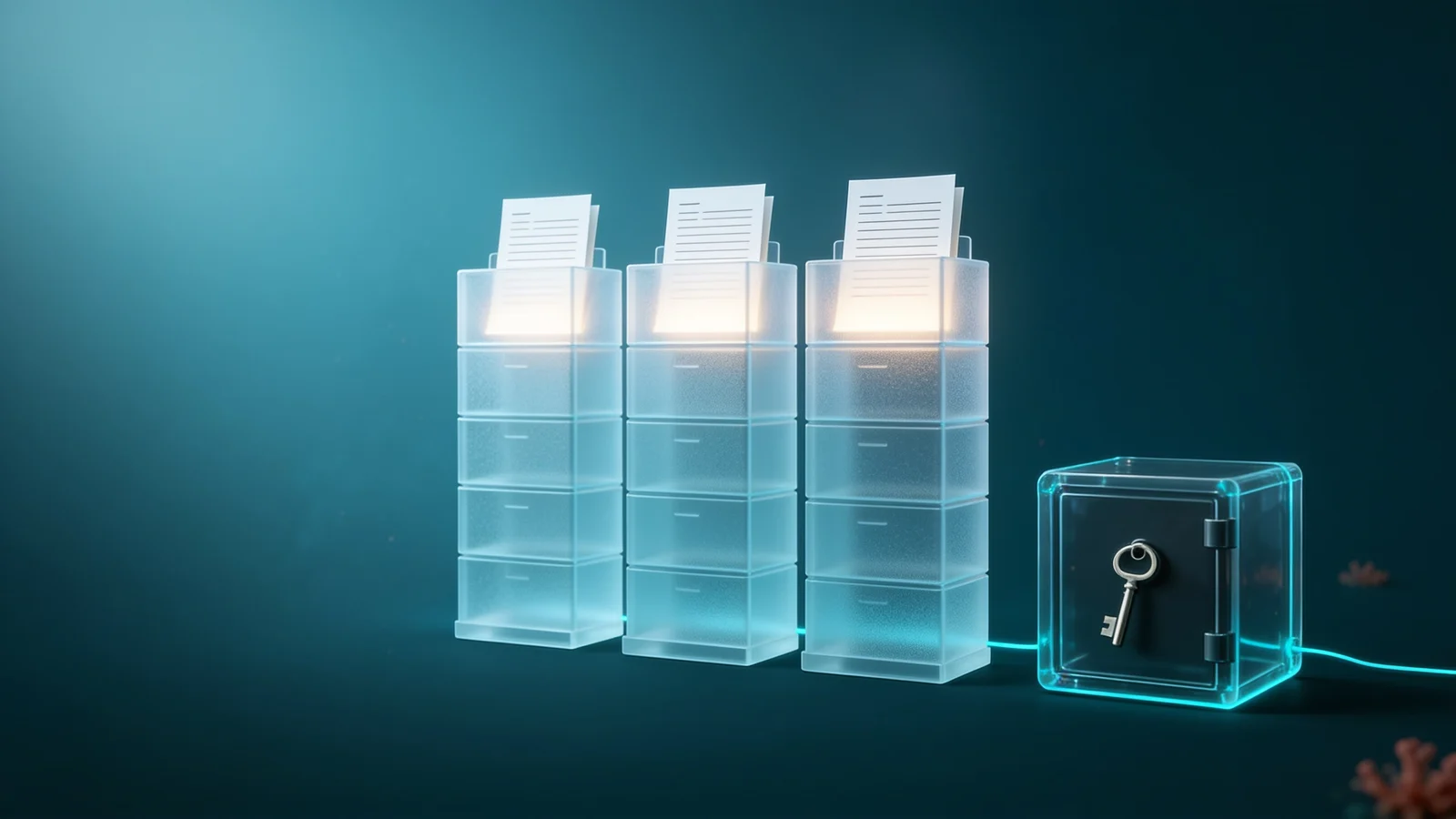
Figure 3. Two independent checks before a document is opened.
The storage applies its own permissions, because the gateway calls it with the user's token and does not use a service account that could read every file. In addition, Cockpit must release the key to exactly this user. If either check fails, the document stays closed. Revoking the right in Cockpit takes effect immediately for new releases; the gateway discards keys held in memory within a few minutes at most.
Limits and Residual Risks
An honest picture includes the following:
- The editing zone sees plaintext. The gateway and Collabora decrypt in memory. If this zone is compromised, the documents opened during the compromise are affected, not the others. In on-premises or hybrid deployments, the organization runs the zone itself; in SaaS (planned), it runs per customer in an AMD SEV-SNP enclave, and Cockpit releases keys only to an attested gateway.
- Metadata remains visible. Nextcloud sees the names, sizes, dates and shares of files. File name encryption is planned; protected folders have no previews and no search index.
- Authorized users. Screenshots and photos of the screen cannot be prevented technically; watermarks and logging act as a deterrent.
- Trust in the gateway. Today, the gateway names the user to Cockpit, restricted to its own namespace. The plan is for Cockpit to verify the user's OIDC token itself.
Compatibility
| Component | Status |
|---|
| Collabora Online 26.04, Nextcloud 33 | Implemented and validated |
| Nextcloud app "Open with DuoKey" | Implemented, Nextcloud 31 to 33 |
| openDesk Community Edition v1.20.0 | Validated, without any change to openDesk |
| OnlyOffice Docs | Partial: compatible protocol, full validation pending |
Save as (PutRelativeFile) and rename | Not yet supported |
Collabora Online and OnlyOffice Docs publish the same discovery format and the same proof signatures, which is why the same gateway can serve both. For many formats, Collabora publishes only an edit action; a user with read rights then gets that address, and the editor opens in read-only mode because CheckFileInfo returns UserCanWrite: false.
The file format is the same as for the SecureFolder agent for Windows and macOS: a file encrypted on the desktop opens in the browser, and vice versa.
Sources
- Microsoft, WOPI protocol (Open Specifications): CheckFileInfo, GetFile, PutFile, locks and proof keys. learn.microsoft.com
- Collabora Online, integration documentation (WOPI). sdk.collaboraonline.com
- Nextcloud, Hub 10 and end-to-end encryption in the browser. help.nextcloud.com
- IETF, RFC 9334, Remote ATtestation procedureS (RATS) Architecture. rfc-editor.org
- AMD, Secure Encrypted Virtualization (SEV-SNP). amd.com